 DIMENSI
Sapling AI Detector: Semak Teks Dijana AI, Tetapi Skornya Bukan Bukti
Rakan sekerja menghantar laporan yang bunyinya terlalu licin. Ayatnya kemas, tetapi terasa kaku. Anda mula ragu sama ada laporan itu ditulis sendiri atau dijana oleh AI (kecerdasan buatan).
Cara yang salah ialah terus menuduh tanpa bukti. Tuduhan begini boleh merosakkan hubungan kerja, apatah lagi jika ia ternyata salah. Anda perlukan cara yang lebih berhati-hati untuk menyemak dahulu.
Sapling AI Detector ialah satu alat yang memberi skor kebarangkalian sesuatu teks dijana AI. Dalam artikel ini, kami terangkan apa fungsinya, berapa harganya, cara bermula dan, yang paling penting, kenapa skornya bukan bukti.
Apa fungsinya
Sapling AI Detector ialah alat semakan daripada syarikat Sapling. Ia memaparkan kebarangkalian sesuatu teks dijana oleh model AI seperti ChatGPT atau Gemini.
Anda boleh menampal teks, memuat naik fail PDF atau Word, atau menyemak halaman web melalui URL (alamat laman web). Keputusannya dipaparkan sebagai “AI-detection score: %”, iaitu peratusan kebarangkalian teks itu dijana AI. Bahagian yang nampak seperti tulisan AI akan diserlahkan supaya mudah dilihat.
Ingat, ini ialah skor kebarangkalian. Ia bukan pengesahan bahawa seseorang telah menggunakan AI.
Ciri utama
- Skor kebarangkalian AI: Memaparkan peratusan kebarangkalian teks dijana oleh model seperti ChatGPT atau Gemini.
- Serlahan bahagian disyaki: Bahagian teks yang nampak dijana AI diserlahkan.
- Skor setiap ayat: Pilihan “Show sentence scores” membolehkan anda menyemak ayat demi ayat.
- Muat naik fail: Menyokong fail PDF dan Word.
- Semakan URL: Boleh menyemak kandungan halaman web melalui alamatnya.
- Banyak bahasa: Bahasa yang disenaraikan ialah Inggeris, Sepanyol, Portugis, Perancis, Jerman, Itali, Belanda, Jepun, Poland, Cina, Arab, Rusia, Sweden, Korea, Turki dan Romania.
Harga
Laman harga Sapling menyenaraikan tiga pelan:
- Free: $0 sebulan. Semakan AI detector sehingga 2,000 aksara setiap semakan, dan 5 fail setiap kelompok.
- Pro: $25 sebulan, atau $12 sebulan jika dibilkan tahunan. Sehingga 100,000 aksara setiap semakan, dan 10 fail setiap kelompok.
- Enterprise: Harga khas. Laman harga menyatakan “Starts at 10 seats, $15/seat/month”, iaitu bermula dengan 10 pengguna pada $15 seorang sebulan.
Harga disemak pada 11 November 2026 dan mungkin berubah.
Cara bermula
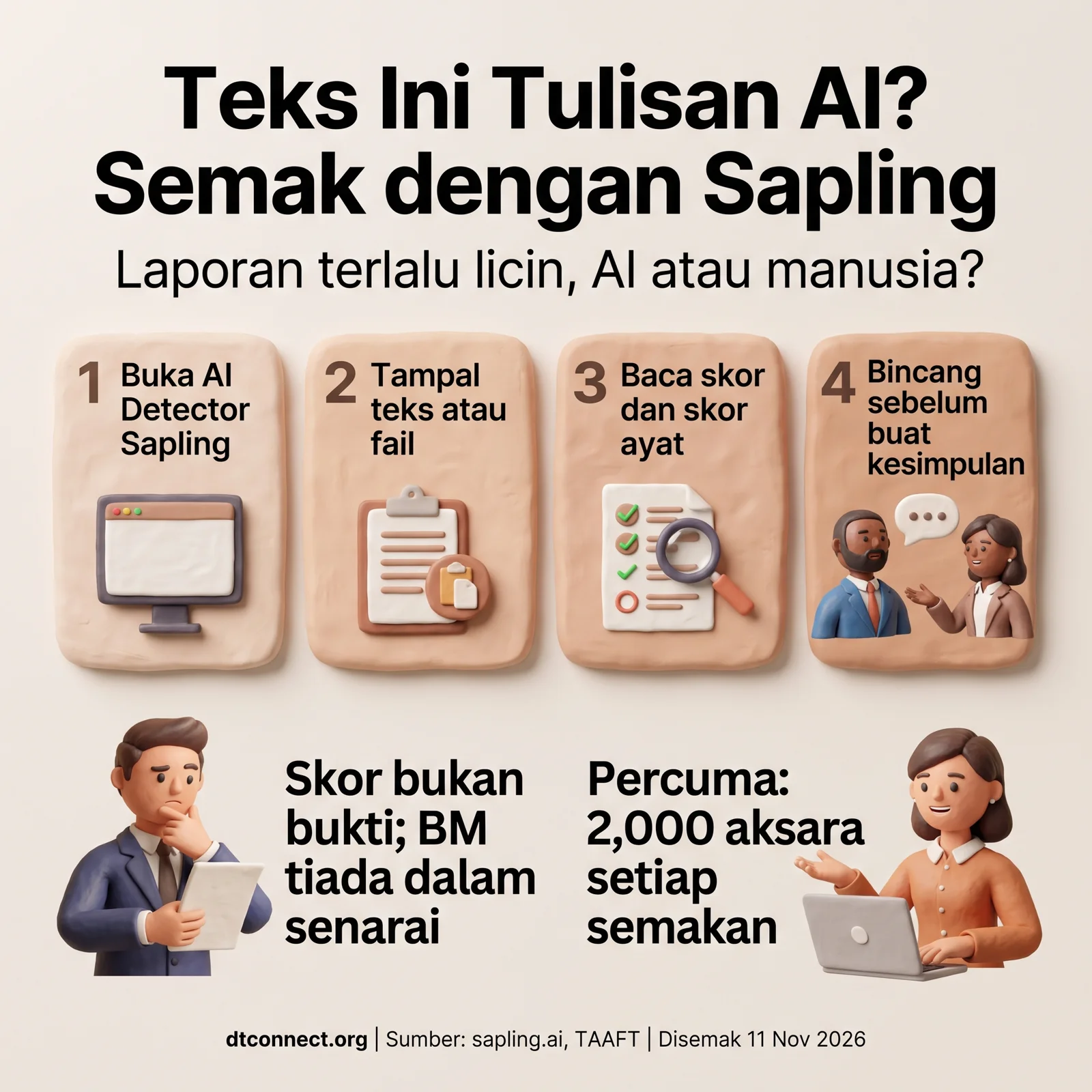
- Buka laman AI Detector di sapling.ai.
- Tampal teks, atau muat naik fail PDF atau Word. Anda juga boleh masukkan URL halaman web.
- Lihat skor keseluruhan “AI-detection score: %” dan bahagian yang diserlahkan.
- Tekan “Show sentence scores” untuk menyemak skor ayat demi ayat.
- Bincang dengan penulis sebelum membuat sebarang kesimpulan.
Had dan perkara yang perlu diberi perhatian
Skor bukan bukti. Sapling sendiri menyatakan “False positives and false negatives will occur.” Maksudnya, positif palsu (tulisan manusia dianggap tulisan AI) dan negatif palsu (tulisan AI tidak dikesan) akan berlaku. Jadi, jangan gunakan skor ini sahaja untuk menuduh atau menghukum sesiapa.
Bahasa Melayu tiada dalam senarai. Bahasa Melayu tidak termasuk dalam senarai bahasa Sapling. Menurut Sapling, bahasa lain dinilai oleh model Inggeris dan “is less reliable”, iaitu kurang boleh dipercayai. Jika anda menyemak laporan dalam bahasa Melayu, anggap skornya lebih lemah lagi sebagai petunjuk.
Teks pendek kurang tepat. Sapling menyatakan pengesannya menjadi jauh lebih tepat selepas kira-kira 50 perkataan. Elakkan membuat andaian berdasarkan satu atau dua ayat sahaja.
Had pelan Free. Pelan Free hanya menyemak sehingga 2,000 aksara setiap semakan. Untuk dokumen panjang, hanya sebahagian teks yang akan disemak dalam satu masa.
Privasi. Polisi privasi Sapling menyatakan “Your content is stored by us and used only to improve the Service.” Maksudnya, kandungan anda disimpan oleh mereka. Tempoh simpanan tidak dinyatakan. Jadi, jangan tampal dokumen sulit, data peribadi pelanggan atau maklumat dalaman syarikat. Ikut dasar data organisasi anda.
Sesuai untuk siapa
Sapling AI Detector sesuai untuk penyelia, pegawai pentadbiran, editor dan sesiapa sahaja yang perlu menilai teks yang diterima. Ia berguna sebagai langkah awal untuk mencari bahagian yang perlu dibincangkan dengan penulis.
Ia paling sesuai untuk teks dalam bahasa yang disenaraikan, seperti bahasa Inggeris. Untuk teks bahasa Melayu, gunakan dengan lebih berhati-hati. Jika kerja anda melibatkan dokumen sulit, minta kebenaran pihak IT atau pengurusan dahulu.
Kesimpulan
Sapling AI Detector memberi skor kebarangkalian teks dijana AI, menyerlahkan bahagian yang disyaki dan membolehkan anda menyemak ayat demi ayat. Anda boleh mula dengan pelan Free sehingga 2,000 aksara setiap semakan. Namun, ingat tiga perkara: skor bukan bukti, bahasa Melayu tiada dalam senarai bahasanya, dan kandungan anda disimpan. Gunakan skor sebagai titik mula perbincangan, bukan sebagai keputusan akhir.
Sumber
- Sapling, AI Content Detector: sapling.ai
- Sapling, Pricing: sapling.ai
- Sapling, Privacy Policy: sapling.ai
Artikel ini bebas dan tidak ditaja. Ciri dan harga disemak pada 11 November 2026 dan mungkin berubah.
Read this article in English
A colleague sends you a report that sounds too smooth. The sentences are neat, but they feel stiff. You start to wonder whether the report was written by the person or generated by AI (artificial intelligence).
The wrong approach is to accuse them straight away without proof. An accusation like this can damage working relationships, especially if it turns out to be wrong. You need a more careful way to check first.
Sapling AI Detector is a tool that gives a probability score for whether a text was generated by AI. In this article we explain what it does, how much it costs, how to get started and, most importantly, why its score is not proof.
What it does
Sapling AI Detector is a checking tool from the company Sapling. It shows the probability that a text was generated by an AI model such as ChatGPT or Gemini.
You can paste text, upload a PDF or Word file, or check a web page through its URL (web address). The result is shown as “AI-detection score: %”, which is the percentage probability that the text was generated by AI. Parts that look like AI writing are highlighted so they are easy to see.
Remember, this is a probability score. It is not confirmation that someone used AI.
Key features
- AI probability score: Shows the percentage probability that a text was generated by a model such as ChatGPT or Gemini.
- Highlighting of suspect parts: Parts of the text that look AI-generated are highlighted.
- Sentence scores: The “Show sentence scores” option lets you check sentence by sentence.
- File upload: Supports PDF and Word files.
- URL check: Can check the content of a web page through its address.
- Many languages: The listed languages are English, Spanish, Portuguese, French, German, Italian, Dutch, Japanese, Polish, Chinese, Arabic, Russian, Swedish, Korean, Turkish and Romanian.
Pricing
The Sapling pricing page lists three plans:
- Free: $0 a month. AI detector checks of up to 2,000 characters per check, and 5 files per batch.
- Pro: $25 a month, or $12 a month when billed annually. Up to 100,000 characters per check, and 10 files per batch.
- Enterprise: Custom pricing. The pricing page states “Starts at 10 seats, $15/seat/month”, which means it starts with 10 users at $15 per person per month.
Prices were checked on 11 November 2026 and may change.
Getting started
- Open the AI Detector page on sapling.ai.
- Paste text, or upload a PDF or Word file. You can also enter a web page URL.
- Look at the overall “AI-detection score: %” and the highlighted parts.
- Click “Show sentence scores” to check the score sentence by sentence.
- Talk to the writer before drawing any conclusion.
Limits and things to watch
The score is not proof. Sapling itself states “False positives and false negatives will occur.” This means false positives (human writing treated as AI writing) and false negatives (AI writing not detected) will happen. So do not use this score alone to accuse or punish anyone.
Malay is not on the list. Malay is not included in Sapling’s list of languages. According to Sapling, other languages are evaluated by the English model and “is less reliable”. If you are checking a report in Malay, treat the score as an even weaker signal.
Short texts are less accurate. Sapling states that its detector becomes much more accurate after about 50 words. Avoid making assumptions based on only one or two sentences.
Free plan limit. The Free plan only checks up to 2,000 characters per check. For long documents, only part of the text will be checked at a time.
Privacy. Sapling’s privacy policy states “Your content is stored by us and used only to improve the Service.” This means your content is stored by them. The retention period is not stated. So do not paste confidential documents, customers’ personal data or internal company information. Follow your organisation’s data policy.
Who it is for
Sapling AI Detector suits supervisors, administrative officers, editors and anyone who needs to assess texts they receive. It is useful as a first step to find parts that should be discussed with the writer.
It is most suitable for texts in the listed languages, such as English. For texts in Malay, use it with extra care. If your work involves confidential documents, ask IT or management for permission first.
Conclusion
Sapling AI Detector gives a probability score for whether a text was generated by AI, highlights suspect parts and lets you check sentence by sentence. You can start with the Free plan, up to 2,000 characters per check. However, remember three things: the score is not proof, Malay is not on its language list, and your content is stored. Use the score as a starting point for discussion, not as a final verdict.
Sources
- Sapling, AI Content Detector: sapling.ai
- Sapling, Pricing: sapling.ai
- Sapling, Privacy Policy: sapling.ai
This article is independent and not sponsored. Features and prices were checked on 11 November 2026 and may change.