 DIMENSI
Wayback Machine: Semak Pautan Rujukan daripada AI Tanpa Kos, Tetapi Tiada Rekod Bukan Bukti Palsu
Anda minta AI (kecerdasan buatan) menyediakan ringkasan laporan beserta senarai rujukan. Jawapannya kemas, tetapi apabila anda klik salah satu pautan, laman itu tidak dapat dibuka.
Ramai orang terus memasukkan pautan itu ke dalam laporan tanpa menyemak. Ada juga yang terus membuangnya dan menganggap AI mereka cipta. Kedua-dua cara ini berisiko. Pautan yang rosak mungkin pernah wujud, dan pautan yang kelihatan betul pula mungkin tidak pernah wujud langsung.
Wayback Machine daripada Internet Archive boleh membantu anda menyemak perkara ini. Ia bukan alat AI. Kami memilihnya kerana ia cara tanpa kos untuk menyemak pautan rujukan yang diberi oleh AI. Dalam artikel ini, kami terangkan apa fungsinya, harganya, cara bermula dan had yang perlu anda faham.
Apa fungsinya
Wayback Machine ialah arkib web (simpanan salinan lama laman web) milik Internet Archive. Menurut laman bantuan rasminya, Internet Archive mula mengarkib web pada tahun 1996.
Cara kerjanya mudah. Anda masukkan alamat web, pilih tarikh, kemudian lihat rupa laman itu pada tarikh tersebut. Jadi, walaupun sesuatu laman sudah dipadam atau diubah, anda masih mungkin dapat membaca versi lamanya.
Bagi pekerja pejabat, ini berguna untuk dua tujuan. Pertama, menyemak sama ada pautan rujukan daripada AI pernah wujud. Kedua, melihat sama ada kandungan asal laman itu benar-benar menyokong apa yang AI tulis.
Ciri utama
- Browse History: Masukkan domain atau URL (alamat laman web), kemudian pilih “Browse History” untuk melihat sejarah laman tersebut.
- Pilih tarikh: Anda boleh memilih tarikh dan membuka versi lama laman pada tarikh itu.
- Save Page Now: Simpan satu laman ke dalam arkib dan dapatkan URL kekal untuk salinan itu. Ciri ini tidak menyimpan keseluruhan laman web atau pautan keluar daripada laman tersebut.
- Sambungan pelayar dan aplikasi: Tersedia untuk Chrome, Firefox dan Safari, serta aplikasi iOS dan Android. Ia boleh memberi amaran jika ada salinan tersimpan bagi laman yang hilang.
- Penghantaran tanpa nama: Penghantaran Save Page Now adalah tanpa nama, dan arkib menyatakan ia tidak menyimpan alamat IP (alamat rangkaian peranti) pengguna.
Harga
- Wayback Machine (semak arkib dan Save Page Now): Tiada harga dinyatakan. Laman rasmi menyatakan koleksinya tersedia “at no cost” dan sesiapa sahaja boleh mengaksesnya melalui archive.org.
- Archive-It: Perkhidmatan langganan berbayar untuk organisasi yang mahu menjalankan crawl (proses mengumpul laman web secara automatik) sendiri. Harga tidak dinyatakan dalam sumber yang kami semak.
- Derma: Internet Archive menerima derma, tetapi ia tidak wajib.
Harga disemak pada 12 November 2026 dan mungkin berubah.
Cara bermula
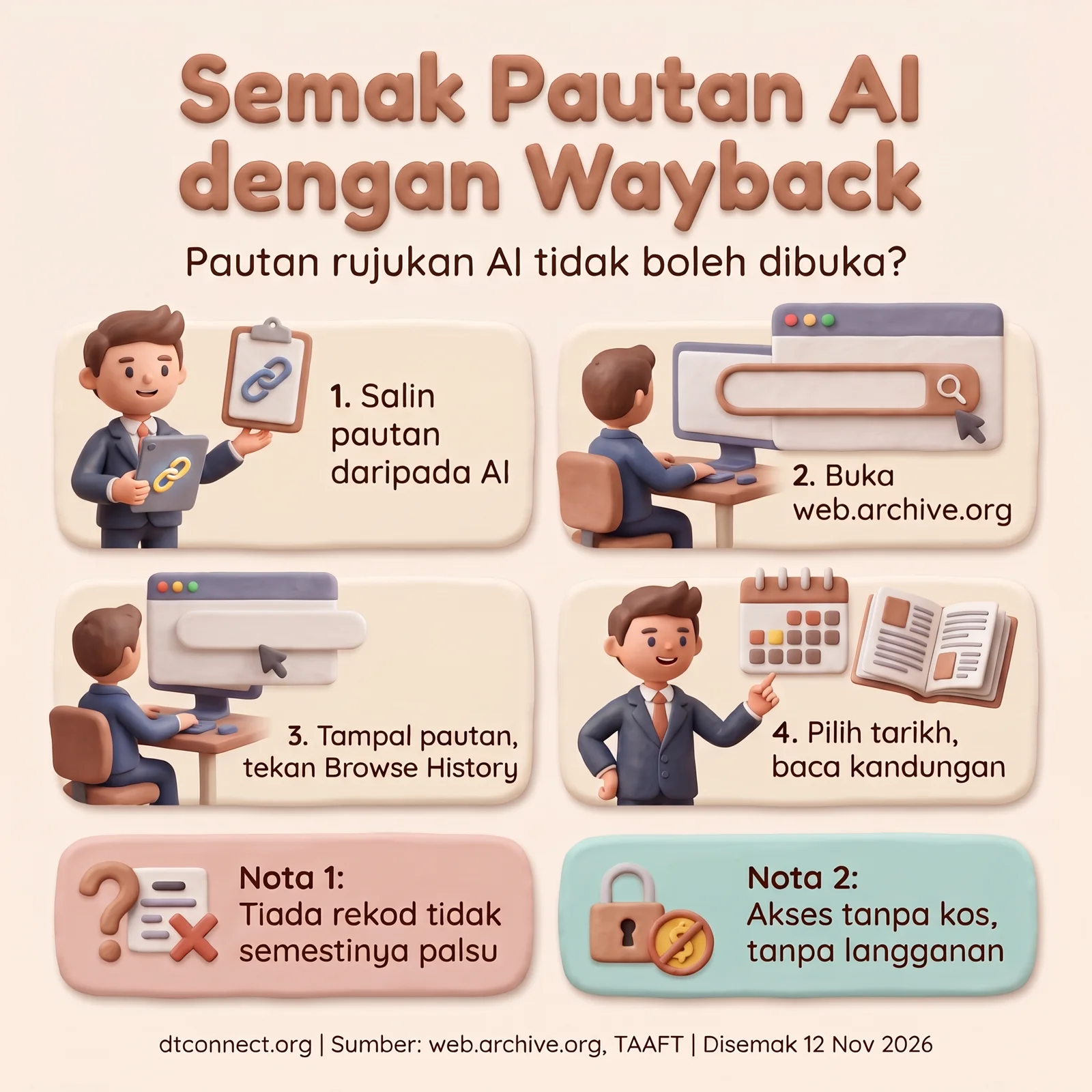
- Salin pautan rujukan yang diberi oleh AI.
- Buka web.archive.org dalam pelayar anda.
- Tampal pautan itu dan pilih “Browse History”.
- Pilih tarikh yang ada rekod, kemudian baca kandungan asal laman tersebut. Pastikan kandungan itu benar-benar menyokong ayat yang ditulis oleh AI.
- Jika tiada rekod, cari sumber rasmi lain sebelum menggunakan maklumat itu.
Had dan perkara yang perlu diberi perhatian
Tiada rekod tidak membuktikan pautan itu palsu. Arkib hanya mengumpul laman yang tersedia secara awam. Laman yang memerlukan kata laluan, laman di sebalik borang dan laman pelayan selamat tidak diarkibkan. Jadi, jika carian anda tidak menemui apa-apa, jangan terus membuat kesimpulan.
Ada laman yang sengaja tidak disimpan. Laman mungkin tiada dalam arkib kerana pengecualian robots (arahan pemilik laman supaya tidak dikumpul), permintaan pemilik laman, atau kerana crawler (program pengumpul laman) tidak tahu laman itu wujud.
Ada rekod tidak bermaksud fakta betul. Wayback Machine hanya menunjukkan rupa laman pada satu tarikh. Anda masih perlu membaca kandungannya dan menilai sama ada sumber itu boleh dipercayai.
Laman baharu ambil masa. Laman yang baru disimpan dengan Save Page Now mungkin mengambil masa beberapa jam hingga beberapa hari untuk dipaparkan.
Data peribadi dan dalaman. Jangan simpan laman yang mengandungi data peribadi atau maklumat dalaman jabatan ke dalam arkib.
Bahasa Melayu. Sokongan antara muka Bahasa Melayu tidak dinyatakan dalam sumber yang kami semak. Alat ini menyimpan laman awam, jadi laman berbahasa Melayu juga boleh disemak, walaupun perkara ini tidak dinyatakan secara khusus.
Sesuai untuk siapa
Wayback Machine sesuai untuk pekerja pejabat, pegawai penyelidik, guru, pelajar dan sesiapa sahaja yang menggunakan AI untuk menyediakan laporan, kertas kerja atau bahan rujukan. Ia amat berguna apabila anda perlu menyerahkan senarai rujukan kepada pihak atasan atau penilai.
Ia juga sesuai untuk pegawai yang perlu menyimpan bukti rupa sesuatu laman awam pada tarikh tertentu, seperti notis atau pengumuman dalam talian.
Kesimpulan
Wayback Machine ialah cara mudah dan tanpa kos untuk menyemak sama ada pautan rujukan daripada AI pernah wujud dan apa kandungan asalnya. Ingat dua perkara penting: tiada rekod tidak semestinya bermaksud pautan itu palsu, dan ada rekod tidak semestinya bermaksud fakta itu betul. Dalam kedua-dua keadaan, cari sumber rasmi sebelum anda menggunakannya.
Sumber
- Internet Archive, Wayback Machine General Information: help.archive.org
- Internet Archive, The Wayback Machine (kategori bantuan): help.archive.org
- Internet Archive, Save Pages in the Wayback Machine: help.archive.org
- There’s An AI For That, Wayback Machine: theresanaiforthat.com
Artikel ini bebas dan tidak ditaja. Ciri dan harga disemak pada 12 November 2026 dan mungkin berubah.
Read this article in English
You ask AI (artificial intelligence) to prepare a report summary with a list of references. The answer looks neat, but when you click one of the links, the page will not open.
Many people put that link straight into their report without checking. Others delete it at once and assume the AI made it up. Both approaches are risky. A broken link may have existed once, and a link that looks correct may never have existed at all.
The Wayback Machine from the Internet Archive can help you check this. It is not an AI tool. We chose it because it is a no-cost way to check reference links that AI gives you. In this article we explain what it does, its pricing, how to get started and the limits you need to understand.
What it does
The Wayback Machine is a web archive (a store of old copies of web pages) run by the Internet Archive. According to its official help page, the Internet Archive began archiving the web in 1996.
It works simply. You enter a web address, pick a date, then see what that page looked like on that date. So even if a page has been deleted or changed, you may still be able to read its older version.
For office workers, this is useful in two ways. First, to check whether a reference link from AI ever existed. Second, to see whether the original content of that page really supports what the AI wrote.
Key features
- Browse History: Enter a domain or URL (web page address), then choose “Browse History” to see the history of that page.
- Pick a date: You can pick a date and open the older version of the page on that date.
- Save Page Now: Save a single page to the archive and get a permanent URL for that copy. It does not save an entire website or the outgoing links from that page.
- Browser extensions and apps: Available for Chrome, Firefox and Safari, as well as iOS and Android apps. They can alert you if there is a saved copy of a page that has gone missing.
- Anonymous submissions: Save Page Now submissions are anonymous, and the archive states that it does not store users’ IP addresses (device network addresses).
Pricing
- Wayback Machine (checking the archive and Save Page Now): No price is stated. The official site states that its collections are available “at no cost” and that anyone can access them through archive.org.
- Archive-It: A paid subscription service for organisations that want to run their own crawls (automatic collection of web pages). The price is not stated in the sources we checked.
- Donations: The Internet Archive accepts donations, but they are not required.
Prices were checked on 12 November 2026 and may change.
How to get started
- Copy the reference link that the AI gave you.
- Open web.archive.org in your browser.
- Paste the link and choose “Browse History”.
- Pick a date that has a record, then read the original content of that page. Make sure the content really supports the sentence the AI wrote.
- If there is no record, look for another official source before using that information.
Limits and things to watch
No record does not prove a link is fake. The archive only collects pages that are publicly available. Password-protected pages, pages behind forms and secure server pages are not archived. So if your search finds nothing, do not jump to conclusions.
Some pages are deliberately not saved. A page may be missing from the archive because of robots exclusions (instructions from the site owner not to collect it), a request from the site owner, or because the crawler (page-collecting program) did not know the page existed.
A record does not mean the facts are correct. The Wayback Machine only shows what a page looked like on one date. You still need to read the content and judge whether the source can be trusted.
New saves take time. A page just saved with Save Page Now may take from a few hours to a few days to appear.
Personal and internal data. Do not save pages that contain personal data or internal department information to the archive.
Malay language. Malay interface support is not stated in the sources we checked. The tool stores public pages, so Malay-language pages can also be checked, although this is not stated specifically.
Who it is for
The Wayback Machine suits office workers, research officers, teachers, students and anyone who uses AI to prepare reports, working papers or reference material. It is especially useful when you need to hand a reference list to your superiors or assessors.
It also suits officers who need to keep proof of what a public page looked like on a certain date, such as an online notice or announcement.
Conclusion
The Wayback Machine is a simple, no-cost way to check whether a reference link from AI ever existed and what its original content was. Remember two important things: no record does not always mean the link is fake, and a record does not always mean the facts are correct. In both cases, look for an official source before you use it.
Sources
- Internet Archive, Wayback Machine General Information: help.archive.org
- Internet Archive, The Wayback Machine (help category): help.archive.org
- Internet Archive, Save Pages in the Wayback Machine: help.archive.org
- There’s An AI For That, Wayback Machine: theresanaiforthat.com
This article is independent and not sponsored. Features and prices were checked on 12 November 2026 and may change.