 DIMENSI
Pitch Agent: Laporan Jadi Slaid dengan AI, Tetapi Kredit Percuma Hanya Sekali
Bos minta slaid untuk mesyuarat esok pagi. Anda cuma ada laporan dalam bentuk PDF. Ramai orang menyalin teks laporan ke slaid satu per satu, kemudian menyusun gambar dan tajuk sendiri. Kerja ini boleh berlarutan sehingga lewat malam.
Pitch ialah aplikasi pembentangan daripada Pitch Software GmbH di Berlin, Jerman. Di dalamnya ada Pitch Agent, pembantu AI (kecerdasan buatan) yang boleh menyusun dek slaid daripada arahan dan fail anda. Namun akaun Free hanya mendapat kredit AI yang terhad, dan hasilnya tetap perlu disemak sebelum dibentangkan.
Apa fungsinya
Pitch Agent membantu anda mencipta dan menyunting dek slaid. Ia boleh mencipta pembentangan baharu daripada arahan (prompt, iaitu teks yang menerangkan apa yang anda mahu), fail yang dimuat naik sebagai konteks dan templat pilihan anda.
Selepas anda klik Generate, Agent memilih slaid daripada templat, mengisi teks dan menambah gambar. Anda tidak perlu bermula dengan slaid kosong.
Dalam editor, anda boleh klik ikon Pitch Agent di bahagian bawah kanan. Dari situ, anda boleh menambah slaid, menukar gambar, bertanya tentang kandungan dek atau menggunakan Quick actions pada blok yang dipilih.
Ciri utama
- Create with AI: cipta pembentangan baharu daripada arahan, fail dan templat pilihan anda.
- Lampiran fail: anda boleh melampirkan fail PDF, MD, TXT atau CSV, atau gambar, sebagai bahan rujukan.
- Pilihan kelajuan: anda boleh memilih kelajuan penjanaan sebelum slaid dicipta.
- Pembantu dalam editor: tambah slaid, tukar gambar atau tanya tentang isi dek melalui ikon Pitch Agent.
- Tindakan AI pada teks: pendekkan, panjangkan atau tulis semula teks.
- Terjemahan slaid: terjemah slaid ke bahasa lain. Pitch tidak menamakan bahasa yang disokong.
- Suntingan gambar: sunting gambar dengan bantuan AI.
- Boleh dimatikan: pentadbir boleh mematikan AI untuk seluruh ruang kerja (workspace) melalui Workspace settings.
Harga
Halaman harga Pitch menyenaraikan pelan Free sebagai “Free forever”. Halaman itu tidak memaparkan angka harga bagi pelan berbayar.
- Pelan Free: pembentangan tanpa had, AI presentation creation, templat tersuai, sehingga 5 ahli, 2 tetamu luar, muat naik gambar sehingga 5MB, sejarah versi 30 hari dan storan 10GB.
- Kredit AI akaun Free: akaun Free baharu mendapat 100 kredit seumur hidup. Kredit ini tidak diisi semula.
- Pro: 500 kredit AI bagi setiap seat (tempat pengguna) sebulan.
- Business: 750 kredit AI bagi setiap seat sebulan.
- Kredit tambahan: 0.004 sekredit. Mata wang tidak dinamakan pada halaman yang disemak.
Pitch tidak menyatakan berapa kredit digunakan bagi setiap tindakan AI. Jadi, anda sukar menganggar berapa dek yang boleh dicipta dengan 100 kredit.
Harga disemak pada 20 November 2026 dan mungkin berubah.
Cara bermula
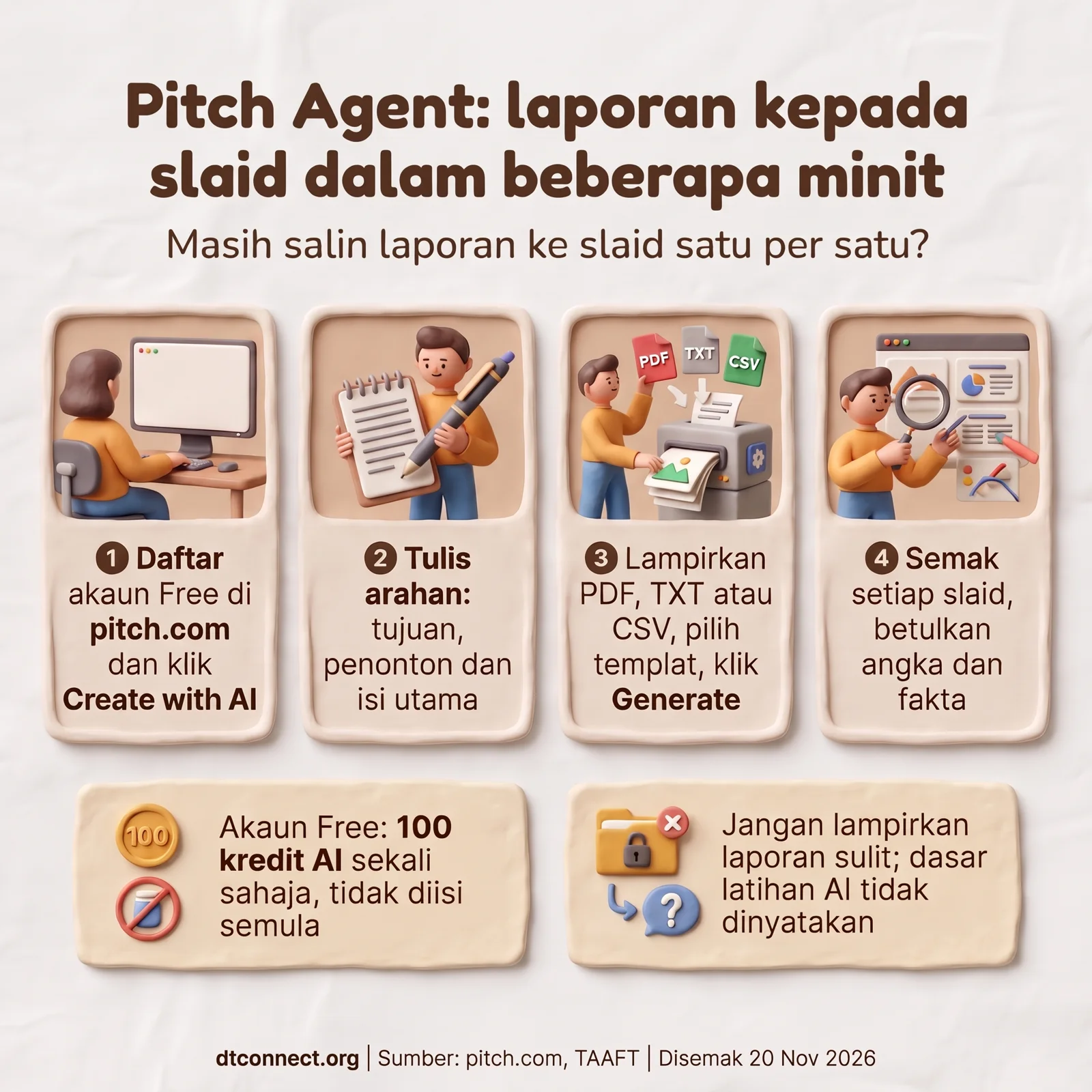
- Daftar akaun Free di pitch.com.
- Di papan pemuka (dashboard, iaitu halaman utama akaun anda), klik Create with AI.
- Tulis arahan yang lengkap. Nyatakan penonton, nada, tujuan dan isi utama pembentangan.
- Lampirkan fail PDF, TXT atau CSV jika perlu. Pilih kelajuan penjanaan dan templat, kemudian klik Generate.
- Semak setiap slaid. Betulkan angka, nama dan fakta sebelum dek dikongsi.
Had dan perkara yang perlu diberi perhatian
- Kredit percuma sekali sahaja: 100 kredit akaun Free tidak diisi semula. Tulis arahan yang lengkap sekali gus supaya kredit tidak cepat habis.
- Kos setiap tindakan tidak jelas: Pitch tidak menyatakan berapa kredit bagi setiap tindakan AI.
- Bahasa Melayu tidak disebut: halaman rasmi yang disemak tidak menamakan bahasa yang disokong. Cuba dengan dek pendek dahulu jika anda mahu slaid dalam Bahasa Melayu.
- Maklumat kredit bercanggah: halaman pelan Free menyebut AI Generator tanpa had kredit, tetapi panduan kredit AI menyatakan 100 kredit seumur hidup. Artikel ini mengikut panduan kredit AI.
- Data diproses di Amerika Syarikat: dasar privasi Pitch menyatakan ia menggunakan alat berasaskan model bahasa besar (large language model, sistem AI yang memahami dan menulis teks) untuk menjana pembentangan. Penerima data ialah penyedia perkhidmatan teknikal di Amerika Syarikat.
- Latihan AI tidak dinyatakan: dasar privasi tidak menyatakan sama ada kandungan pengguna digunakan untuk melatih model AI. Jangan lampirkan laporan sulit.
- Tempoh simpanan data: data biasanya dipadam 3 tahun selepas aktiviti terakhir atau selepas akaun dipadam.
- Semak sebelum bentang: slaid dijana mesin. Angka dan fakta mesti disemak dengan laporan asal.
Sesuai untuk siapa
- Pekerja pejabat yang kerap menukar laporan kepada slaid mesyuarat.
- Pegawai yang perlu menyediakan dek taklimat dengan cepat daripada fail PDF atau CSV.
- Pasukan kecil yang mahu bekerjasama dalam satu ruang kerja, sehingga 5 ahli pada pelan Free.
Ia kurang sesuai jika anda perlu mencipta banyak dek dengan AI setiap bulan menggunakan akaun Free, kerana kredit tidak diisi semula. Ia juga kurang sesuai untuk dokumen sulit, atau jika dasar jabatan anda tidak membenarkan data diproses oleh penyedia di luar negara.
Kesimpulan
Pitch Agent boleh menukar arahan dan fail laporan kepada dek slaid lengkap dengan teks dan gambar. Pelan Free kekal percuma, tetapi akaun baharu hanya mendapat 100 kredit AI sekali sahaja. Ingat tiga perkara: tulis arahan yang lengkap, semak setiap angka, dan jangan lampirkan laporan sulit. Cuba pelan Free Pitch dengan laporan yang tidak sulit hari ini.
Sumber
- Artikel bantuan rasmi Pitch: Pitch Agent
- Artikel bantuan rasmi Pitch: cara mencipta pembentangan baharu
- Halaman harga rasmi Pitch
- Artikel bantuan rasmi Pitch: panduan kredit AI
- Artikel bantuan rasmi Pitch: tindakan AI dalam Pitch
- Dasar privasi rasmi Pitch
Artikel ini bebas dan tidak ditaja. Ciri dan harga disemak pada 20 November 2026 dan mungkin berubah.
Read this article in English
Your boss wants slides for tomorrow morning’s meeting. All you have is a report in PDF. Many people copy the report text onto slides one by one, then arrange the images and titles themselves. This work can drag on until late at night.
Pitch is a presentation app from Pitch Software GmbH in Berlin, Germany. It includes Pitch Agent, an AI (artificial intelligence) assistant that can build a slide deck from your prompt and files. But Free accounts only get limited AI credits, and the result still needs to be checked before you present it.
What it does
Pitch Agent helps you create and edit slide decks. It can create a new presentation from a prompt (text that describes what you want), files uploaded as context and a template of your choice.
After you click Generate, the Agent picks slides from the template, fills in the text and adds images. You do not need to start from a blank slide.
In the editor, you can click the Pitch Agent icon at the bottom right. From there, you can add slides, swap images, ask about the deck’s content or use Quick actions on a selected block.
Key features
- Create with AI: create a new presentation from a prompt, files and a template of your choice.
- File attachments: you can attach PDF, MD, TXT or CSV files, or images, as reference material.
- Speed options: you can choose the generation speed before the slides are created.
- Assistant in the editor: add slides, swap images or ask about the deck through the Pitch Agent icon.
- AI text actions: shorten, lengthen or rewrite text.
- Slide translation: translate slides into another language. Pitch does not name the supported languages.
- Image editing: edit images with AI help.
- Can be turned off: admins can disable AI for the whole workspace through Workspace settings.
Price
Pitch’s pricing page lists the Free plan as “Free forever”. The page does not show prices for the paid plans.
- Free plan: unlimited presentations, AI presentation creation, custom templates, up to 5 members, 2 external guests, image uploads up to 5MB, 30 days of version history and 10GB of storage.
- Free account AI credits: new Free accounts get 100 lifetime credits. These credits do not refill.
- Pro: 500 AI credits per seat (user place) per month.
- Business: 750 AI credits per seat per month.
- Extra credits: 0.004 per credit. The currency is not named on the pages checked.
Pitch does not state how many credits each AI action uses. So it is hard to estimate how many decks you can create with 100 credits.
Prices were checked on 20 November 2026 and may change.
Getting started
- Sign up for a Free account at pitch.com.
- On the dashboard (your account’s main page), click Create with AI.
- Write a complete prompt. State the audience, tone, goal and main points of the presentation.
- Attach a PDF, TXT or CSV file if needed. Choose the generation speed and a template, then click Generate.
- Check every slide. Fix numbers, names and facts before you share the deck.
Limits and things to watch
- Free credits only once: the 100 Free account credits do not refill. Write one complete prompt so your credits last longer.
- Cost per action unclear: Pitch does not state how many credits each AI action uses.
- Malay is not mentioned: the official pages checked do not name the supported languages. Try a short deck first if you want slides in Malay.
- Conflicting credit information: the Free plan page mentions an AI Generator with no credit limit, but the AI credits guide states 100 lifetime credits. This article follows the AI credits guide.
- Data processed in the United States: Pitch’s privacy policy states that it uses tools based on large language models (AI systems that understand and write text) to generate presentations. The data recipients are technical service providers in the United States.
- AI training not stated: the privacy policy does not state whether user content is used to train AI models. Do not attach confidential reports.
- Data retention: data is usually deleted 3 years after the last activity or after the account is deleted.
- Check before presenting: the slides are machine generated. Numbers and facts must be checked against the original report.
Who it is for
- Office workers who often turn reports into meeting slides.
- Officers who need to prepare briefing decks quickly from PDF or CSV files.
- Small teams who want to work together in one workspace, up to 5 members on the Free plan.
It is less suitable if you need to create many decks with AI every month on a Free account, because the credits do not refill. It is also less suitable for confidential documents, or if your department’s policy does not allow data to be processed by providers overseas.
Conclusion
Pitch Agent can turn a prompt and report files into a complete slide deck with text and images. The Free plan stays free, but new accounts only get 100 AI credits once. Remember three things: write a complete prompt, check every number, and do not attach confidential reports. Try Pitch’s Free plan with a report that is not confidential today.
Sources
- Official Pitch help article: Pitch Agent
- Official Pitch help article: Create a new presentation
- Official Pitch pricing page
- Official Pitch help article: Guide to AI credits
- Official Pitch help article: Pitch’s AI actions
- Official Pitch privacy policy
This article is independent and not sponsored. Features and prices were checked on 20 November 2026 and may change.