 DIMENSI
Jotform AI Form Generator: Borang Pejabat Siap dengan Satu Arahan, Tetapi Jaga Data dalam Arahan
Bos minta borang pendaftaran kursus dalaman, dan anda perlu siapkan sebelum petang. Cara biasa, anda taip soalan satu demi satu, susun semula, kemudian ulang lagi apabila bos tukar fikiran. Kerja yang nampak kecil ini boleh memakan masa dan memenatkan.
Jotform AI Form Generator ialah alat daripada syarikat Jotform yang membina borang dalam talian daripada arahan teks. Anda tulis apa yang anda mahu, dan AI (kecerdasan buatan) membina draf borang untuk anda. Namun pelan percuma ada had bilangan borang, dan anda perlu berhati-hati dengan maklumat yang anda tulis dalam arahan.
Apa fungsinya
Alat ini membina borang dalam talian daripada arahan (prompt, iaitu teks yang menerangkan apa yang anda mahu). Contohnya, anda boleh menulis “borang pendaftaran kursus dalaman dengan nama, jabatan dan tarikh”. AI kemudian menyediakan draf borang dengan soalan yang berkaitan.
Selepas borang dijana, anda tidak perlu menyunting semuanya sendiri. Anda boleh berbual dengan chatbot AI (program yang menjawab dan bertindak melalui perbualan teks) untuk menukar soalan, teks atau warna borang.
Apabila borang sudah siap, anda boleh berkongsi pautan borang dengan rakan sekerja. Anda juga boleh membenamkan (embed, iaitu memaparkan terus) borang itu dalam laman web. Di laman Jotform, alat ini dipaparkan dengan nama AI Form Builder di bawah produk AI.
Ciri utama
- Borang daripada arahan teks: tulis jenis borang dan maklumat yang anda perlukan, dan AI membina draf borang.
- Ubah melalui chatbot: berbual dengan chatbot AI untuk menambah, membuang atau mengubah soalan, teks dan warna.
- Kongsi melalui pautan: hantar pautan borang kepada sesiapa sahaja yang perlu mengisinya.
- Benam dalam laman web: paparkan borang terus dalam laman web jabatan atau syarikat anda.
- Sokongan AI tanpa had: menurut soalan lazim Jotform, sokongan AI tiada had penggunaan. Namun had bilangan borang bergantung pada pelan langganan anda.
Harga
Menurut soalan lazim Jotform, AI Form Generator percuma digunakan. Halaman harga pula menyenaraikan pelan Starter sebagai “FREE”. Laman utama Jotform mempunyai butang daftar percuma.
- Pelan Starter (percuma): 5 borang, 100 serahan (jawapan borang yang dihantar) sebulan, 10,000 paparan borang sebulan dan ruang storan 100 MB.
- Had borang: bilangan borang yang boleh anda bina bergantung pada pelan langganan. Jika anda perlukan lebih banyak borang, semak pelan lain di halaman harga Jotform.
- Had AI dalam pelan percuma: halaman harga menyenaraikan “AI Agent Limits” untuk Starter tetapi tidak memberi angka. Soalan lazim pula menyatakan sokongan AI tiada had. Jadi, had AI sebenar dalam pelan percuma tidak jelas.
Label “FREE” di halaman harga juga bertanda asterisk (*), tetapi tiada nota kaki yang kelihatan untuk menerangkannya.
Harga disemak pada 21 November 2026 dan mungkin berubah.
Cara bermula
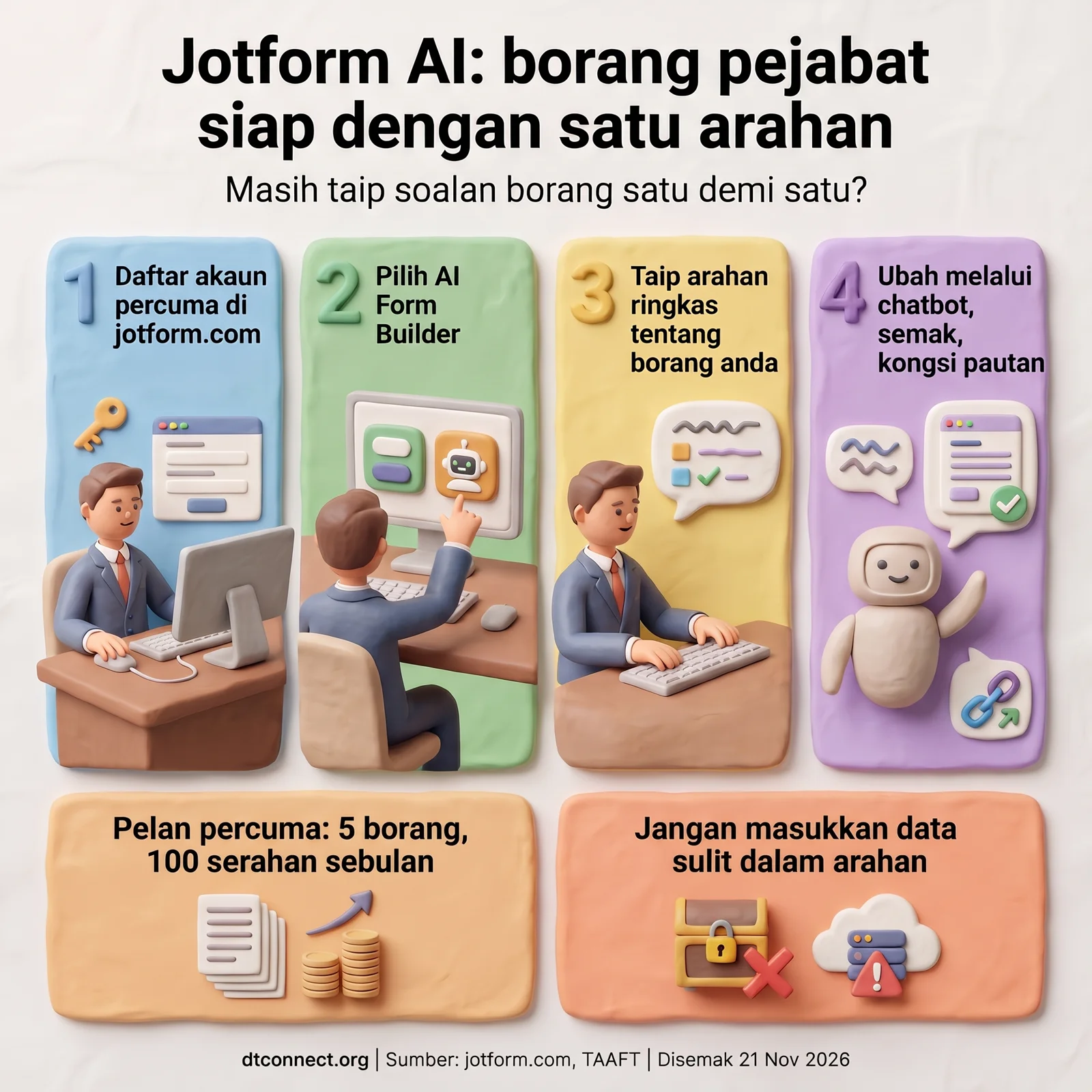
- Buka jotform.com dan daftar akaun percuma.
- Pilih AI Form Builder di bawah produk AI.
- Tulis arahan ringkas, contohnya “borang pendaftaran kursus dalaman dengan nama, jabatan dan tarikh”.
- Berbual dengan chatbot AI untuk menambah, membuang atau mengubah soalan dan warna.
- Semak setiap soalan dan pilihan jawapan, kemudian kongsi pautan borang kepada rakan sekerja.
Had dan perkara yang perlu diberi perhatian
- Had pelan percuma: pelan Starter hanya memberi 5 borang dan 100 serahan sebulan. Untuk acara besar atau borang yang kerap diisi, had ini mungkin cepat dicapai.
- Reka bentuk melalui AI masih terhad: soalan lazim menyatakan reka bentuk melalui AI masih terhad, contohnya menukar warna borang. Anda mungkin perlu membuat suntingan sendiri untuk rupa yang lebih kemas.
- Kandungan borang mungkin digunakan untuk latihan: Jotform menyatakan data pengguna dan arahan tidak digunakan untuk melatih AI Form Generator. Namun kandungan borang dan medan borang (ruang jawapan seperti “Nama” atau “Jabatan”) mungkin digunakan untuk melatih sistemnya, tanpa nama atau data peribadi.
- Jaga data sulit: Jotform menasihati pengguna supaya hanya memasukkan maklumat yang selesa dikongsi dalam arahan. Jangan tulis nama pegawai, nombor kad pengenalan atau maklumat sulit jabatan dalam arahan. Baca dasar privasi Jotform dahulu.
- Semak sebelum kongsi: borang dibina oleh AI. Pastikan setiap soalan, ejaan dan pilihan jawapan betul sebelum pautan dihantar.
- Had AI tidak jelas: maklumat tentang had AI dalam pelan percuma berbeza antara halaman harga dan soalan lazim.
Sesuai untuk siapa
- Pekerja pejabat yang kerap menyediakan borang pendaftaran kursus, mesyuarat atau program dalaman.
- Pegawai sumber manusia atau latihan yang perlu mengumpul maklum balas peserta dengan cepat.
- Kakitangan unit kecil yang hanya perlukan beberapa borang dan bilangan jawapan yang sederhana.
Ia kurang sesuai jika borang anda perlu mengumpul data peribadi atau sulit dalam jumlah besar, kerana pelan percuma hanya membenarkan 100 serahan sebulan dan kandungan borang mungkin digunakan untuk melatih sistem Jotform. Dalam keadaan ini, rujuk dahulu dasar data organisasi anda.
Kesimpulan
Jotform AI Form Generator boleh menjimatkan masa apabila anda perlu menyiapkan borang dengan cepat. Anda hanya menulis arahan, kemudian mengubah borang melalui perbualan dengan chatbot AI. Ingat tiga perkara: semak setiap soalan sebelum berkongsi, jangan masukkan data sulit dalam arahan, dan ambil kira had 5 borang serta 100 serahan sebulan dalam pelan percuma. Cuba bina satu borang ringkas dengan pelan percuma Jotform hari ini.
Sumber
- Halaman rasmi Jotform AI Form Builder dan soalan lazim
- Halaman rasmi harga Jotform
- Laman rasmi Jotform
Artikel ini bebas dan tidak ditaja. Ciri dan harga disemak pada 21 November 2026 dan mungkin berubah.
Read this article in English
Your boss asks for an internal course registration form, and you need it done before the afternoon. The usual way, you type the questions one by one, rearrange them, then do it all again when your boss changes their mind. This small job can take time and wear you out.
Jotform AI Form Generator is a tool from Jotform that builds online forms from a text prompt. You write what you want, and AI (artificial intelligence) builds a draft form for you. But the free plan limits how many forms you can have, and you need to be careful about what you write in your prompt.
What it does
The tool builds online forms from a prompt (text that describes what you want). For example, you can write “an internal course registration form with name, department and date”. The AI then prepares a draft form with the relevant questions.
After the form is generated, you do not have to edit everything yourself. You can chat with an AI chatbot (a program that answers and acts through a text conversation) to change the questions, text or colours of the form.
When the form is ready, you can share the form link with your colleagues. You can also embed (display directly) the form on a website. On the Jotform site, the tool appears as AI Form Builder under the AI products.
Key features
- Forms from a text prompt: write the type of form and the information you need, and the AI builds a draft form.
- Edit through a chatbot: chat with the AI chatbot to add, remove or change questions, text and colours.
- Share by link: send the form link to anyone who needs to fill it in.
- Embed on a website: display the form directly on your department or company website.
- Unlimited AI support: according to Jotform’s FAQ, AI support has no usage limit. However, the number of forms depends on your subscription plan.
Pricing
According to Jotform’s FAQ, the AI Form Generator is free to use. The pricing page lists the Starter plan as “FREE”. The Jotform home page has a free sign up button.
- Starter plan (free): 5 forms, 100 submissions (completed form responses) per month, 10,000 form views per month and 100 MB of storage.
- Form limit: the number of forms you can build depends on your subscription plan. If you need more forms, check the other plans on the Jotform pricing page.
- AI limits on the free plan: the pricing page lists “AI Agent Limits” for Starter but gives no numbers. The FAQ says AI support has no limit. So the real AI limit on the free plan is unclear.
The “FREE” label on the pricing page also has an asterisk (*), but there is no visible footnote explaining it.
Prices were checked on 21 November 2026 and may change.
How to get started
- Open jotform.com and sign up for a free account.
- Choose AI Form Builder under the AI products.
- Write a short prompt, for example “an internal course registration form with name, department and date”.
- Chat with the AI chatbot to add, remove or change questions and colours.
- Check every question and answer option, then share the form link with your colleagues.
Limits and things to watch
- Free plan limits: the Starter plan gives only 5 forms and 100 submissions per month. For large events or forms that are filled in often, you may reach these limits quickly.
- AI design is still limited: the FAQ says design through AI is still limited, for example changing the form colours. You may need to make some edits yourself for a neater look.
- Form content may be used for training: Jotform states that user data and prompts are not used to train the AI Form Generator. However, form content and form fields (answer spaces such as “Name” or “Department”) may be used to train its system, without names or personal data.
- Protect confidential data: Jotform advises users to only enter information they are comfortable sharing in the prompt. Do not write officers’ names, identity card numbers or confidential department information in the prompt. Read Jotform’s privacy policy first.
- Check before sharing: the form is built by AI. Make sure every question, spelling and answer option is correct before you send the link.
- Unclear AI limits: information about AI limits on the free plan differs between the pricing page and the FAQ.
Who it is for
- Office workers who often prepare registration forms for internal courses, meetings or programmes.
- Human resources or training officers who need to collect participant feedback quickly.
- Staff in small units who only need a few forms and a moderate number of responses.
It is less suitable if your form needs to collect personal or confidential data in large amounts, because the free plan only allows 100 submissions per month and form content may be used to train Jotform’s system. In this case, check your organisation’s data policy first.
Conclusion
Jotform AI Form Generator can save time when you need to finish a form quickly. You only write a prompt, then change the form by chatting with the AI chatbot. Remember three things: check every question before sharing, do not put confidential data in the prompt, and keep in mind the free plan limit of 5 forms and 100 submissions per month. Try building one simple form with Jotform’s free plan today.
Sources
This article is independent and not sponsored. Features and prices were checked on 21 November 2026 and may change.