 DIMENSI
Ask Photos dalam Google Photos: Siapa Boleh Baca Soalan Anda, dan Cara Menutupnya
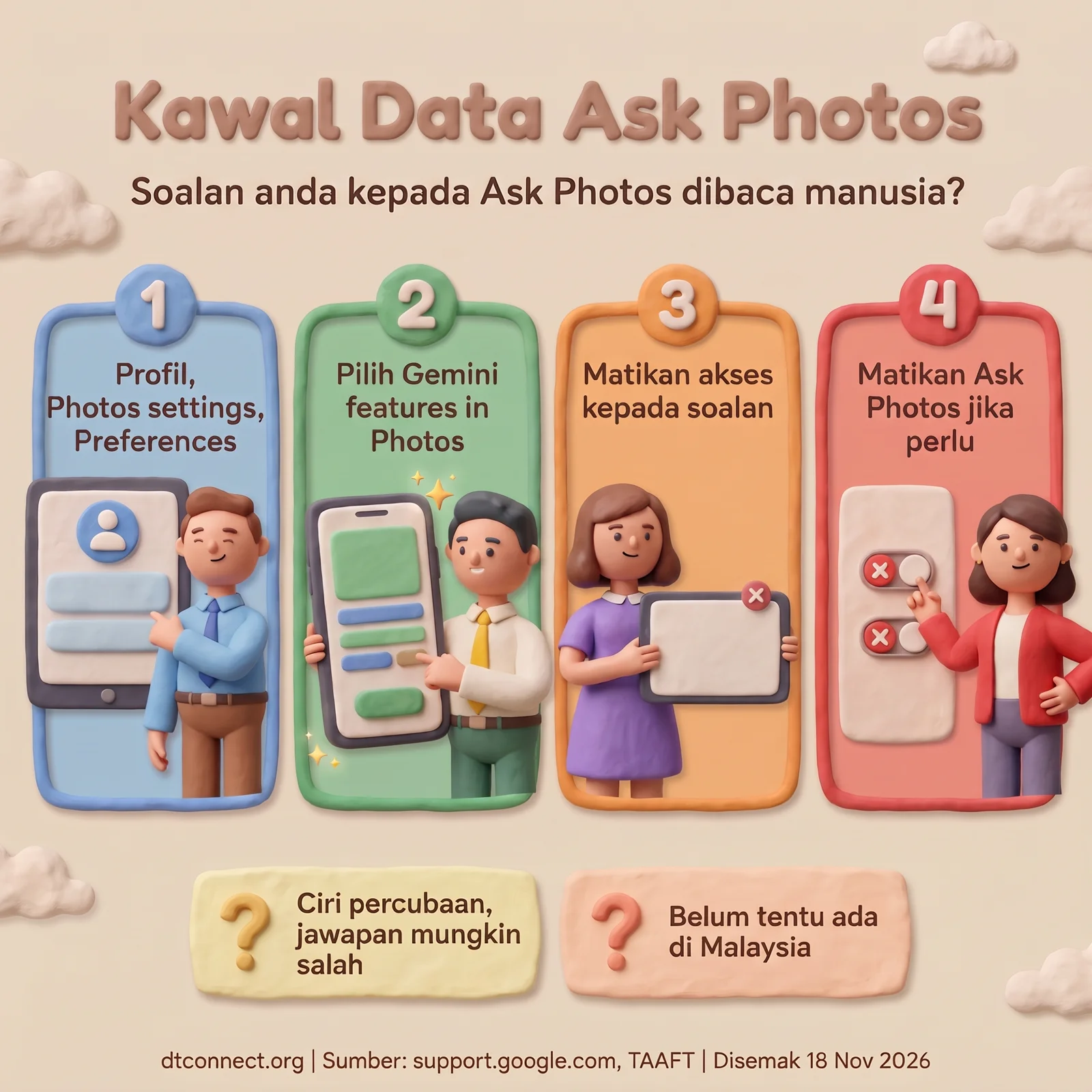
Anda mungkin pernah bertanya kepada Ask Photos dalam Google Photos. Contohnya, anda mahu mencari gambar resit atau gambar dokumen kerja yang diambil minggu lalu. Ramai orang menyangka soalan seperti itu kekal peribadi sepenuhnya. Sebenarnya, Google menyatakan soalan anda boleh disemak oleh manusia untuk menambah baik Photos.
Ini bukan bermakna ciri ini berbahaya. Namun anda patut tahu apa yang berlaku kepada soalan dan gambar anda. Berita baiknya, Google menyediakan tetapan untuk menghentikan semakan soalan, dan juga untuk mematikan Ask Photos sepenuhnya. Artikel ini menerangkan tetapan itu langkah demi langkah.
Apa fungsinya
Ask Photos ialah sebahagian daripada ciri Gemini dalam Google Photos. Ciri ini menggunakan model Gemini (model AI buatan Google) untuk menjawab soalan tentang gambar dan video dalam galeri anda. Anda boleh menaip soalan dengan bahasa biasa, dan Photos cuba mencari jawapannya.
Menurut halaman bantuan Google, Ask Photos ialah ciri percubaan Google Labs (ruang Google untuk menguji ciri baharu). Oleh itu, ia mungkin memberi jawapan yang tidak tepat.
Untuk menjawab soalan anda, ciri ini menggunakan gambar, video, label kumpulan wajah, nama dan maklumat dalam Akaun Google anda. Google juga boleh membuat anggaran seperti umur dan lokasi bagi kumpulan wajah utama anda.
Ciri utama
- Soalan tentang galeri: anda boleh bertanya tentang gambar dan video anda, dan Gemini cuba menjawab berdasarkan isi galeri.
- Help us improve photos: tetapan yang mengawal sama ada Google boleh mengakses soalan anda untuk menambah baik Photos. Pilihan di dalamnya bernama Allow us to access your queries.
- Search with Ask Photos: suis untuk menghidupkan atau mematikan Ask Photos sahaja.
- Use Gemini in Photos: suis untuk mematikan semua ciri Gemini dalam Photos sekali gus.
- Remember List: senarai fakta yang disimpan oleh ciri ini. Anda boleh melihat dan memadam fakta itu.
- Photos Activity: tempat maklum balas anda disimpan. Anda boleh memadamnya di myactivity.google.com/product/photos.
Harga
Tetapan ini terbina dalam aplikasi Google Photos. Halaman bantuan rasmi Google yang disemak tidak menyatakan sebarang harga untuk Ask Photos atau ciri Gemini dalam Photos.
Harga disemak pada 18 November 2026 dan mungkin berubah.
Cara bermula
Untuk menghentikan semakan soalan anda oleh manusia:
- Buka aplikasi Google Photos dan tekan gambar profil anda.
- Pilih Photos settings, kemudian Preferences.
- Pilih Gemini features in Photos.
- Buka Help us improve photos dan matikan Allow us to access your queries.
- Jika anda tidak perlukan Ask Photos, matikan Search with Ask Photos di halaman Gemini features in Photos yang sama.
- Jika anda mahu mematikan semua ciri Gemini, matikan Use Gemini in Photos.
- Untuk memadam fakta yang disimpan, buka Gemini features in Photos, pilih Remember List, kemudian tekan Delete.
- Untuk memadam maklum balas, pergi ke myactivity.google.com/product/photos. Ingat, pemadaman tidak berlaku serta-merta.
Had dan perkara yang perlu diberi perhatian
- Soalan boleh dibaca manusia: menurut Google, manusia tidak menyemak jawapan Ask Photos kecuali anda memberi maklum balas, atau dalam kes penyalahgunaan yang jarang berlaku. Namun soalan anda boleh disemak oleh manusia selepas dipisahkan daripada Akaun Google anda.
- Privasi data: Google menyatakan data peribadi Photos tidak digunakan untuk iklan, kecuali jika anda menyambungkan Photos kepada perkhidmatan lain yang menyokong iklan. Google juga menyatakan ia tidak melatih model AI generatif (AI yang menjana kandungan baharu) di luar Google Photos dengan data peribadi Photos anda. Perkhidmatan lain yang anda sambungkan mengikut dasar masing-masing. Ini jaminan syarikat. Walaupun begitu, jangan simpan gambar dokumen sulit kerja dalam galeri peribadi anda.
- Label menu mungkin berbeza: dua halaman bantuan Google tidak sama. Satu halaman menyebut “Your Ask Photos Activity” untuk menghentikan semakan soalan. Halaman lain menyebut Help us improve photos dan Allow us to access your queries. Jika anda tidak menemui satu label, cari label yang satu lagi.
- Ciri percubaan: Ask Photos mungkin tersilap. Semak semula jawapannya sebelum anda bergantung kepadanya.
- Syarat penggunaan: satu halaman bantuan menyatakan anda perlu berumur 18 tahun ke atas. Face Groups (ciri pengumpulan wajah) perlu dihidupkan, dan hanya gambar yang disandarkan (backup ke awan) berfungsi.
- Ketersediaan di Malaysia tidak disahkan: Google hanya menyebut ciri ini tersedia di negara dan rantau terpilih. Senarai negara dan bahasa tidak dinyatakan. Jadi menu di telefon anda mungkin berbeza atau tiada.
- Sejarah soalan: halaman bantuan yang disemak tidak menerangkan cara memadam sejarah soalan Ask Photos. Yang diterangkan hanyalah Remember List dan maklum balas dalam Photos Activity.
Sesuai untuk siapa
- Pekerja pejabat yang menggunakan Google Photos di telefon dan pernah mencuba Ask Photos.
- Sesiapa yang menyimpan gambar resit, slip atau dokumen dalam galeri dan mahu lebih kawalan privasi.
- Ibu bapa atau ahli keluarga yang membantu orang lain menyemak tetapan telefon mereka.
Panduan ini kurang sesuai jika anda tidak menggunakan Google Photos, atau jika ciri Gemini belum muncul dalam aplikasi anda. Dalam keadaan itu, tiada apa yang perlu dimatikan buat masa ini.
Kesimpulan
Ask Photos boleh membantu anda mencari gambar dengan cepat. Namun soalan anda boleh disemak oleh manusia selepas dipisahkan daripada akaun. Jika anda tidak selesa, matikan Allow us to access your queries. Jika anda tidak memerlukan Ask Photos, matikan Search with Ask Photos. Semak juga Remember List anda. Ingat, label menu mungkin berbeza dan ciri ini belum tentu tersedia di Malaysia. Luangkan dua minit untuk menyemak tetapan Google Photos anda hari ini.
Sumber
- Halaman bantuan rasmi Google Photos: privasi ciri Gemini dalam Photos
- Halaman bantuan rasmi Google Photos: tetapan Ask Photos dan ciri Gemini
Artikel ini bebas dan tidak ditaja. Ciri dan harga disemak pada 18 November 2026 dan mungkin berubah.
Read this article in English
You may have asked Ask Photos in Google Photos a question. For example, you wanted to find a photo of a receipt or a work document taken last week. Many people assume questions like that stay fully private. In fact, Google states that your questions may be reviewed by people to improve Photos.
This does not mean the feature is dangerous. But you should know what happens to your questions and photos. The good news is that Google provides settings to stop query review, and also to turn off Ask Photos completely. This article explains those settings step by step.
What it does
Ask Photos is part of the Gemini features in Google Photos. It uses Gemini models (AI models made by Google) to answer questions about the photos and videos in your gallery. You can type a question in everyday language, and Photos tries to find the answer.
According to Google’s help pages, Ask Photos is an experimental Google Labs feature (Google’s space for testing new features). So it may give inaccurate answers.
To answer your questions, the feature uses your photos, videos, face group labels, names and information in your Google Account. Google may also make estimates such as the age and location of your main face groups.
Key features
- Questions about your gallery: you can ask about your photos and videos, and Gemini tries to answer based on your gallery.
- Help us improve photos: a setting that controls whether Google can access your queries to improve Photos. The option inside it is called Allow us to access your queries.
- Search with Ask Photos: a switch to turn Ask Photos alone on or off.
- Use Gemini in Photos: a switch to turn off all Gemini features in Photos at once.
- Remember List: a list of facts saved by the feature. You can view and delete them.
- Photos Activity: where your feedback is stored. You can delete it at myactivity.google.com/product/photos.
Price
These settings are built into the Google Photos app. The official Google help pages checked do not state any price for Ask Photos or the Gemini features in Photos.
Prices were checked on 18 November 2026 and may change.
Getting started
To stop people reviewing your questions:
- Open the Google Photos app and tap your profile picture.
- Choose Photos settings, then Preferences.
- Choose Gemini features in Photos.
- Open Help us improve photos and turn off Allow us to access your queries.
- If you do not need Ask Photos, turn off Search with Ask Photos on the same Gemini features in Photos page.
- If you want to turn off all Gemini features, turn off Use Gemini in Photos.
- To delete saved facts, open Gemini features in Photos, choose Remember List, then tap Delete.
- To delete feedback, go to myactivity.google.com/product/photos. Remember, deletion is not immediate.
Limits and things to watch
- Questions can be read by people: according to Google, people do not review Ask Photos answers unless you give feedback, or in rare cases of abuse. However, your questions may be reviewed by people after they are disconnected from your Google Account.
- Data privacy: Google states that your personal Photos data is not used for ads, unless you connect Photos to other services that support ads. Google also states that it does not train generative AI models (AI that creates new content) outside Google Photos with your personal Photos data. Other services you connect follow their own policies. This is a company assurance. Even so, do not keep photos of confidential work documents in your personal gallery.
- Menu labels may differ: two Google help pages do not match. One page mentions “Your Ask Photos Activity” to stop query review. The other mentions Help us improve photos and Allow us to access your queries. If you cannot find one label, look for the other.
- Experimental feature: Ask Photos may make mistakes. Double check its answers before you rely on them.
- Requirements: one help page states you must be 18 or older. Face Groups (the face grouping feature) must be turned on, and only backed up photos (saved to the cloud) work.
- Availability in Malaysia not confirmed: Google only says the feature is available in select countries and regions. The list of countries and languages is not stated. So the menus on your phone may differ or be missing.
- Query history: the help pages checked do not explain how to delete your Ask Photos query history. They only cover the Remember List and feedback in Photos Activity.
Who it is for
- Office workers who use Google Photos on their phone and have tried Ask Photos.
- Anyone who keeps photos of receipts, slips or documents in their gallery and wants more privacy control.
- Parents or family members who help others check their phone settings.
This guide is less suitable if you do not use Google Photos, or if Gemini features have not appeared in your app yet. In that case, there is nothing to turn off for now.
Conclusion
Ask Photos can help you find photos quickly. But your questions may be reviewed by people after being disconnected from your account. If you are not comfortable with that, turn off Allow us to access your queries. If you do not need Ask Photos, turn off Search with Ask Photos. Also check your Remember List. Remember, menu labels may differ and the feature may not be available in Malaysia. Take two minutes to check your Google Photos settings today.
Sources
- Official Google Photos help page: privacy of Gemini features in Photos
- Official Google Photos help page: Ask Photos and Gemini feature settings
This article is independent and not sponsored. Features and prices were checked on 18 November 2026 and may change.