 DIMENSI
Notion AI untuk Tugas Pejabat: Cara Ringkas dan Baiki Dokumen Kerja Tanpa Salin ke Chatbot Luar
Dokumen kerja itu sudah 15 muka surat. Bos pula mahu ringkasan sebelum mesyuarat pukul 3 petang. Anda belum habis membacanya lagi. Situasi ini biasa berlaku di pejabat.
Ramai pekerja memilih jalan pintas. Mereka menyalin seluruh dokumen ke chatbot luar, termasuk maklumat syarikat. Cara ini memenatkan kerana anda perlu bertukar tetingkap berulang kali. Cara ini juga berisiko kerana maklumat kerja keluar dari tempat asalnya.
Jika pasukan anda sudah menyimpan nota, minit dan draf dalam Notion, ada pilihan lain. Notion AI boleh meringkaskan halaman dan membaiki tulisan terus di dalam dokumen kerja anda. Artikel ini menerangkan fungsinya, harganya, cara bermula dan perkara yang perlu anda semak.
Apa fungsinya
Notion AI ialah pembantu AI (kecerdasan buatan) yang terbina dalam Notion. Ia boleh menulis, menyunting, meringkaskan dan menterjemah kandungan terus pada halaman kerja. Anda tidak perlu menyalin teks ke aplikasi lain.
Notion juga mempunyai Notion Agent. Agent boleh meringkaskan halaman yang sedang anda buka. Anda boleh @-mention (menyebut dengan simbol @) halaman, orang atau tarikh supaya Agent mendapat konteks tambahan. Agent juga boleh menjawab berdasarkan ruang kerja anda, aplikasi yang disambungkan seperti Slack dan Google Drive, serta carian web jika ciri itu dihidupkan.
Ciri utama
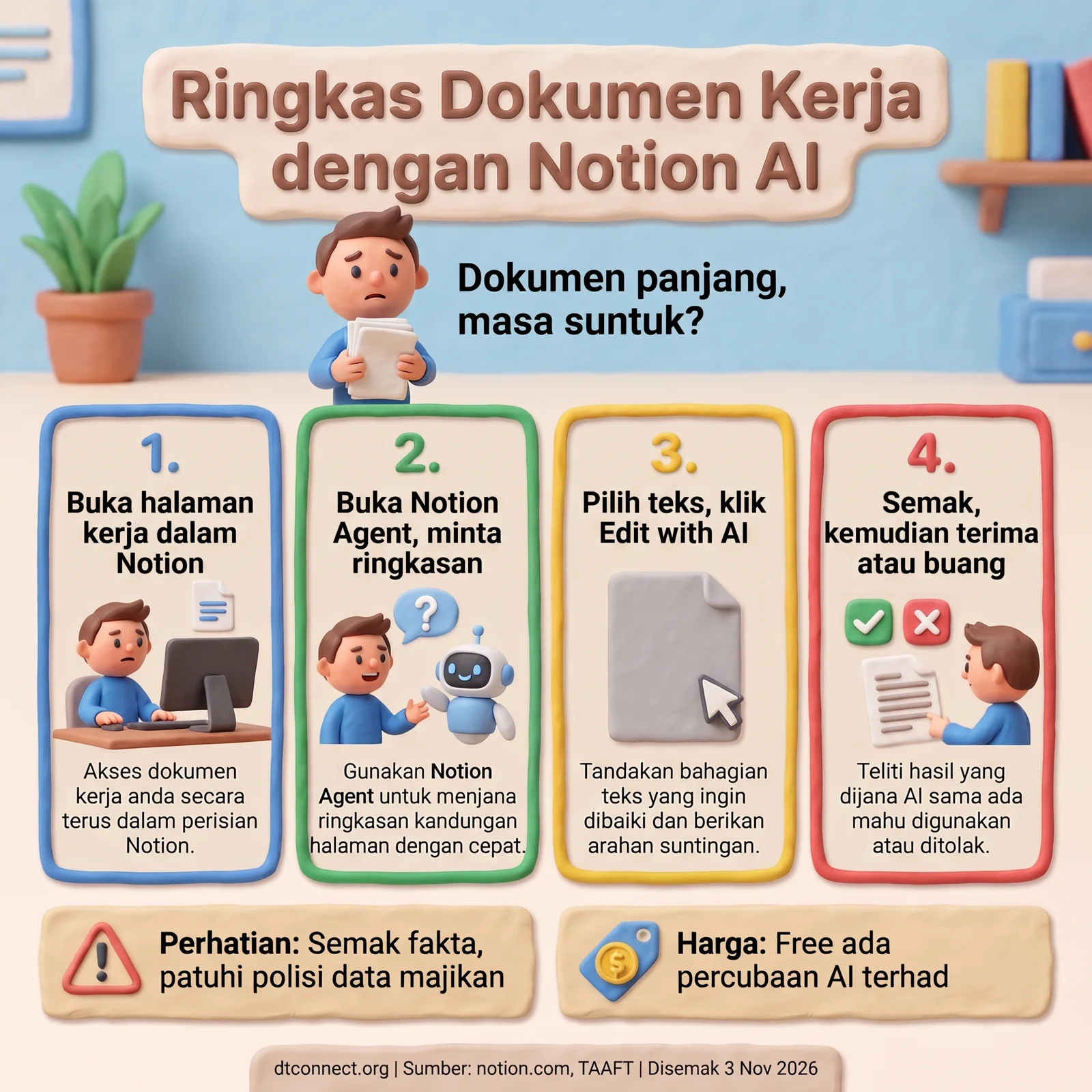
- Edit with AI: Pilih teks, kemudian klik “Edit with AI”. Anda boleh membetulkan tatabahasa, menukar nada, atau memanjangkan dan memendekkan tulisan. Hasilnya boleh diterima, dibuang atau dicuba semula.
- Ringkasan halaman: Notion Agent boleh meringkaskan halaman semasa.
- Terjemahan: Gunakan menu ••• > More > Translate, atau minta Agent “Translate this page”.
- Akses pantas: Tekan kekunci space pada baris kosong untuk membuka Notion AI. Anda juga boleh menekan shift + cmd/ctrl + J dari mana-mana halaman. Pintasan ini boleh ditukar di Settings, Preferences.
- Notion Agent: Boleh dibuka dari bar sisi atau dari penjuru bawah skrin.
- AI Meeting Notes: Disenaraikan untuk pelan Business dan Enterprise. Dalam aplikasi desktop, taip /meet dan pilih Start transcribing untuk mendapatkan transkrip (teks bertulis daripada rakaman).
Harga
Pelan Free (USD0) termasuk “Trial of Notion AI”. Pengguna Free dan Plus mendapat jumlah respons AI percuma yang terhad untuk mencuba. Walau bagaimanapun, jumlah tepatnya tidak dinyatakan.
Seperti dipaparkan pada halaman harga, pelan Plus ialah USD10 dan pelan Business ialah USD20 seorang sebulan. Halaman itu juga menyebut anda boleh jimat sehingga 20% jika membayar secara tahunan. Halaman tersebut tidak menjelaskan sama ada harga ini untuk bil bulanan atau tahunan. Akses penuh Notion AI ada pada pelan Business dan Enterprise.
Harga disemak pada 3 November 2026 dan mungkin berubah.
Cara bermula
- Buka halaman kerja anda dalam Notion. Mulakan dengan halaman yang tidak sulit.
- Buka Notion Agent dari bar sisi, kemudian minta ringkasan halaman ini.
- Jika perlu, @-mention halaman atau tarikh lain supaya Agent mendapat konteks tambahan.
- Pilih perenggan yang janggal, klik “Edit with AI”, dan taip arahan seperti “betulkan tatabahasa”.
- Semak hasilnya, kemudian pilih terima, buang atau cuba semula.
Had dan perkara yang perlu diberi perhatian
- Semak setiap fakta. AI boleh tersilap. Baca semula ringkasan sebelum menghantarnya kepada bos.
- Data dan privasi. Secara lalai, Notion dan pembekal AI-nya tidak menggunakan data pelanggan untuk melatih model. Bagi pelan Free, Plus dan Business, pembekal AI menyimpan data selama 30 hari atau kurang, kemudian memadamnya. Namun, patuhi juga polisi data majikan anda.
- Bahasa Melayu belum disahkan. Tiada halaman rasmi yang menyenaraikan bahasa sokongan Notion AI untuk penulisan. Cuba dahulu dan nilai hasilnya sendiri.
- Had penggunaan. Had penggunaan boleh menjeda akses anda buat sementara waktu.
- Percubaan terhad. Bilangan respons AI percuma pada pelan Free tidak dinyatakan. Jangan bergantung padanya untuk kerja harian yang berat.
- AI Meeting Notes bukan untuk semua pelan. Halaman bantuan menyebut pelan Business dan Enterprise sahaja. Senarai bahasanya tidak termasuk Bahasa Melayu. Label penutur hanya dalam bahasa Inggeris. Notion menggesa persetujuan semua peserta, dan hadnya ialah 10 jam sehari bagi setiap pengguna.
Sesuai untuk siapa
Notion AI sesuai untuk pekerja pejabat dan pasukan kecil yang sudah menyimpan nota, minit dan draf dalam Notion. Ia membantu jika anda kerap perlu meringkaskan dokumen panjang atau membaiki tulisan sebelum dihantar. Jika pasukan anda belum menggunakan Notion, anda perlu menilai sama ada berbaloi untuk memindahkan kerja ke situ.
Kesimpulan
Notion AI membolehkan anda meringkas dan membaiki dokumen kerja tanpa menyalinnya ke chatbot luar. Langkahnya mudah: buka halaman, minta ringkasan, baiki teks dengan “Edit with AI”, dan semak hasilnya. Mulakan dengan pelan Free untuk mencuba. Ingat, setiap ringkasan perlu disemak, dan polisi data majikan anda tetap perlu dipatuhi.
Sumber
- Notion, Notion Pricing Plans: notion.com
- Notion, What is Notion AI?: notion.com
- Notion, Use Notion AI to write better, more efficient notes and docs: notion.com
- Notion, Notion AI security and privacy practices: notion.com
- Notion, Take AI Meeting Notes in Notion: notion.com
- There’s An AI For That, Notion: theresanaiforthat.com
Artikel ini bebas dan tidak ditaja. Ciri dan harga disemak pada 3 November 2026 dan mungkin berubah.
Read this article in English
That work document is already 15 pages long. Your boss wants a summary before the 3 pm meeting. You have not even finished reading it. This happens often in the office.
Many workers take a shortcut. They copy the whole document into an outside chatbot, including company information. This is tiring because you keep switching windows. It is also risky because work information leaves its original place.
If your team already keeps notes, minutes and drafts in Notion, there is another option. Notion AI can summarise pages and improve writing directly inside your work documents. This article explains what it does, what it costs, how to start and what you should check.
What it does
Notion AI is an AI (artificial intelligence) assistant built into Notion. It can write, edit, summarise and translate content directly on your work pages. You do not need to copy text into another app.
Notion also has Notion Agent. The Agent can summarise the page you have open. You can @-mention pages, people or dates to give the Agent extra context. The Agent can also answer based on your workspace, connected apps such as Slack and Google Drive, and web search if that feature is turned on.
Key features
- Edit with AI: Select text, then click “Edit with AI”. You can fix grammar, change the tone, or make writing longer or shorter. You can accept, discard or retry the result.
- Page summaries: Notion Agent can summarise the current page.
- Translation: Use the ••• menu > More > Translate, or ask the Agent to “Translate this page”.
- Quick access: Press the space key on an empty line to open Notion AI. You can also press shift + cmd/ctrl + J from any page. This shortcut can be changed in Settings, Preferences.
- Notion Agent: Can be opened from the sidebar or from the bottom corner of the screen.
- AI Meeting Notes: Listed for the Business and Enterprise plans. In the desktop app, type /meet and choose Start transcribing to get a transcript (written text of a recording).
Pricing
The Free plan (USD0) includes a “Trial of Notion AI”. Free and Plus users get a limited number of free AI responses to try it out. However, the exact number is not stated.
As displayed on the pricing page, the Plus plan is USD10 and the Business plan is USD20 per seat per month. The page also says you can save up to 20% by paying yearly. The page does not make clear whether these prices are for monthly or yearly billing. Full Notion AI access is on the Business and Enterprise plans.
Prices were checked on 3 November 2026 and may change.
How to get started
- Open your work page in Notion. Start with a page that is not confidential.
- Open Notion Agent from the sidebar, then ask for a summary of this page.
- If needed, @-mention another page or date to give the Agent extra context.
- Select an awkward paragraph, click “Edit with AI”, and type an instruction such as “fix the grammar”.
- Check the result, then choose accept, discard or try again.
Limits and things to watch
- Check every fact. AI can make mistakes. Reread the summary before sending it to your boss.
- Data and privacy. By default, Notion and its AI providers do not use customer data to train models. For the Free, Plus and Business plans, AI providers keep data for 30 days or less, then delete it. Still, follow your employer’s data policy too.
- Bahasa Melayu not confirmed. No official page lists the languages Notion AI supports for writing. Try it first and judge the results yourself.
- Usage limits. Usage limits can pause your access temporarily.
- Limited trial. The number of free AI responses on the Free plan is not stated. Do not rely on it for heavy daily work.
- AI Meeting Notes is not for every plan. The help page mentions the Business and Enterprise plans only. Its language list does not include Bahasa Melayu. Speaker labels are in English only. Notion prompts for consent from all participants, and the limit is 10 hours a day per user.
Who it suits
Notion AI suits office workers and small teams who already keep notes, minutes and drafts in Notion. It helps if you often need to summarise long documents or polish writing before sending it. If your team does not use Notion yet, you need to judge whether moving your work there is worth it.
Conclusion
Notion AI lets you summarise and improve work documents without copying them into an outside chatbot. The steps are simple: open the page, ask for a summary, polish text with “Edit with AI”, and check the result. Start with the Free plan to try it. Remember, every summary needs checking, and your employer’s data policy still applies.
Sources
- Notion, Notion Pricing Plans: notion.com
- Notion, What is Notion AI?: notion.com
- Notion, Use Notion AI to write better, more efficient notes and docs: notion.com
- Notion, Notion AI security and privacy practices: notion.com
- Notion, Take AI Meeting Notes in Notion: notion.com
- There’s An AI For That, Notion: theresanaiforthat.com
This article is independent and not sponsored. Features and prices were checked on 3 November 2026 and may change.