 DIMENSI
Siri Sijil AI Pendidik (02): AI untuk Pendidik, Modul 1 dan 2 di Microsoft Learn
Anda guru atau pensyarah yang mahu mula menggunakan AI (kecerdasan buatan, iaitu perisian yang boleh menjana teks, imej atau jawapan), tetapi tidak tahu dari mana? Ramai terus mencuba alat AI secara rawak tanpa faham cara ia berfungsi. Akhirnya, hasilnya tidak seperti yang diharapkan.
Laluan pembelajaran AI for educators di Microsoft Learn dibina untuk masalah ini. Ia sesuai untuk guru, pensyarah dan juga pekerja yang mahu faham asas AI sebelum menggunakannya. Dr. Muhamad Hariz, penulis Dimensi, telah menamatkan kursus ini. Episod kedua siri ini merumus Modul 1 dan Modul 2. Modul 3 dan Modul 4 akan dibincangkan dalam episod akan datang.
Tentang kursus ini
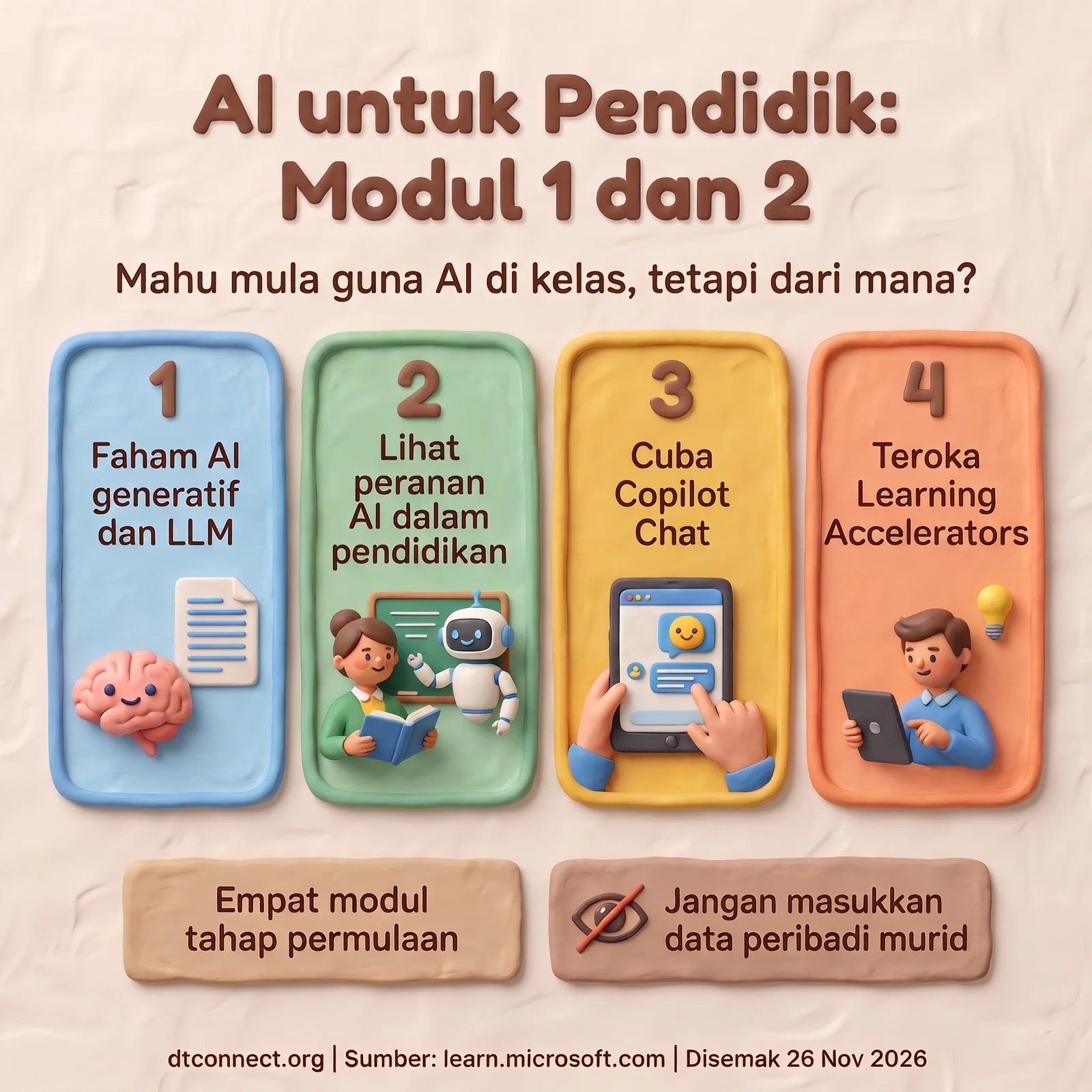
AI for educators ialah laluan pembelajaran (learning path, iaitu satu set modul yang disusun mengikut urutan) di Microsoft Learn. Ia ada empat modul tahap Beginner (permulaan). Peranan sasarannya ialah K-12 Educator (guru sekolah) dan Higher Education Educator (pensyarah pengajian tinggi).
Kandungan laluan ini meliputi sejarah ringkas AI, model bahasa besar (LLM, iaitu model AI yang dilatih dengan banyak teks untuk memahami dan menghasilkan bahasa), AI generatif, prompt engineering (cara menulis arahan kepada AI), penggunaan AI secara bertanggungjawab, Copilot, Image Creator from Designer, Edge, Word, PowerPoint dan Minecraft.
Bagaimana dengan kos? Tajuk Modul 2 ada perkataan “free”, tetapi perkataan itu merujuk kepada alat AI percuma Microsoft Education untuk pendidik dan pelajar, bukan kepada kursus. Halaman laluan tidak menyatakan secara jelas bahawa kursus ini percuma. Kursus ini ditawarkan di Microsoft Learn, jadi sila semak sendiri di laman rasmi sebelum bermula.
Perkara utama
- Modul 1: “Empower educators to explore the potential of artificial intelligence”. Modul ini ada 9 unit: Introduction, Introduction to AI, Generative AI, Large language models, Use AI-powered image generation capabilities effectively, AI in education, AI tools for educators and accessibility, Module assessment dan Summary.
- Objektif Modul 1. Menurut catatan kursus penulis, anda belajar menerangkan AI generatif (AI yang menghasilkan kandungan baharu) dan LLM, menggunakan LLM untuk menjana, mengembang dan meringkas teks, serta memahami bagaimana AI boleh mengurangkan beban kerja pendidik dan menjadikan pembelajaran lebih inklusif (merangkumi semua murid).
- Modul 2: “Embark on your AI journey with free AI tools from Microsoft Education”. Modul ini ada 10 unit. Peranan sasarannya ialah K-12 Educator dan School Leader (pemimpin sekolah).
- Alat yang diperkenalkan dalam Modul 2. Copilot Chat, Learning Accelerators, Microsoft Teams for Education, AI Foundations dalam Minecraft Education dan GitHub Copilot.
- Penilaian. Setiap modul ada Module assessment (ujian ringkas di akhir modul). Menurut catatan kursus penulis, anda perlu log masuk akaun Microsoft untuk merekod pencapaian.
Apa maksudnya untuk anda
Modul 1 memberi asas. Contohnya, apabila anda faham LLM boleh meringkas teks, anda boleh meminta AI meringkaskan satu bahan bacaan panjang kepada beberapa perkara utama untuk murid. Apabila anda faham ia boleh mengembangkan teks, anda boleh meminta draf soalan perbincangan daripada satu idea ringkas.
Modul 2 pula membawa anda kepada alat sebenar. Anda tidak perlu mencuba semuanya serentak. Pilih satu alat yang paling dekat dengan kerja harian anda, seperti Copilot Chat untuk menyediakan draf bahan, atau Teams for Education jika kelas anda sudah menggunakannya.
Bagi pekerja di luar bidang pendidikan, Modul 1 tetap berguna kerana ia menerangkan cara AI generatif berfungsi dalam bahasa yang mudah.
Cara mula mengamalkan
- Buka laman Microsoft Learn dan cari AI for educators.
- Log masuk akaun Microsoft supaya pencapaian anda direkod.
- Mula dengan Modul 1 untuk faham AI generatif dan LLM.
- Teruskan ke Modul 2 dan pilih satu alat untuk satu tugas kecil, contohnya meringkas bahan bacaan.
- Semak hasilnya dengan teliti sebelum digunakan di kelas.
Perkara yang perlu diberi perhatian
Semak setiap hasil AI. AI boleh membuat silap, jadi anggap hasilnya sebagai draf. Jangan masukkan data peribadi murid ke dalam mana-mana alat AI. Ingat juga bahawa Modul 2 ditujukan kepada guru sekolah dan pemimpin sekolah, jadi sebahagian contohnya mungkin perlu disesuaikan jika anda pensyarah. Ketersediaan alat juga mungkin berbeza mengikut akaun dan institusi anda, jadi semak di laman rasmi.
Kesimpulan
Modul 1 dan Modul 2 AI for educators ialah titik mula yang baik. Modul 1 membantu anda faham apa itu AI generatif dan LLM. Modul 2 memperkenalkan alat AI percuma Microsoft Education yang boleh dicuba. Mula kecil, semak setiap hasil, dan lindungi data murid. Dalam episod akan datang, kita akan merumus Modul 3 dan Modul 4.
Sumber
- Microsoft Learn: AI for educators (laluan pembelajaran)
- Microsoft Learn: Empower educators to explore the potential of artificial intelligence (Modul 1)
- Microsoft Learn: Embark on your AI journey with free AI tools from Microsoft Education (Modul 2)
Ringkasan ini ditulis oleh Dimensi berdasarkan pengalaman penulis menamatkan kursus ini dan semakan laman rasmi. Ia bukan bahan rasmi penyedia kursus. Artikel ini bebas dan tidak ditaja.
Ikuti siri ini: Siri Sijil AI Pendidik: Semua Episod
Read this article in English
Are you a teacher or lecturer who wants to start using AI (artificial intelligence, software that can generate text, images or answers), but you do not know where to begin? Many people jump straight into trying AI tools at random without understanding how they work. In the end, the results are not what they hoped for.
The AI for educators learning path on Microsoft Learn is built for this problem. It suits teachers, lecturers and also workers who want to understand the basics of AI before using it. Dr. Muhamad Hariz, the writer of Dimensi, has completed this course. This second episode of the series summarises Module 1 and Module 2. Module 3 and Module 4 will be covered in a later episode.
About this course
AI for educators is a learning path (a set of modules arranged in order) on Microsoft Learn. It has four Beginner level modules. Its target roles are K-12 Educator (school teachers) and Higher Education Educator (higher education lecturers).
The path covers a brief history of AI, large language models (LLMs, AI models trained on large amounts of text to understand and produce language), generative AI, prompt engineering (how to write instructions for AI), responsible use of AI, Copilot, Image Creator from Designer, Edge, Word, PowerPoint and Minecraft.
What about cost? The title of Module 2 contains the word “free”, but that word refers to Microsoft Education’s free AI tools for educators and students, not to the course. The path page does not explicitly state that the course is free. The course is offered on Microsoft Learn, so please check the official site yourself before you start.
Key points
- Module 1: “Empower educators to explore the potential of artificial intelligence”. This module has 9 units: Introduction, Introduction to AI, Generative AI, Large language models, Use AI-powered image generation capabilities effectively, AI in education, AI tools for educators and accessibility, Module assessment and Summary.
- Module 1 objectives. According to the writer’s course notes, you learn to explain generative AI (AI that produces new content) and LLMs, use LLMs to generate, expand and summarise text, and understand how AI can reduce educators’ workload and make learning more inclusive (reaching all students).
- Module 2: “Embark on your AI journey with free AI tools from Microsoft Education”. This module has 10 units. Its target roles are K-12 Educator and School Leader.
- Tools introduced in Module 2. Copilot Chat, Learning Accelerators, Microsoft Teams for Education, AI Foundations in Minecraft Education and GitHub Copilot.
- Assessment. Each module has a Module assessment (a short test at the end of the module). According to the writer’s course notes, you need to sign in with a Microsoft account to record your progress.
What it means for you
Module 1 gives you the foundation. For example, once you understand that an LLM can summarise text, you can ask AI to summarise a long reading into a few key points for students. Once you understand that it can expand text, you can ask for draft discussion questions from a short idea.
Module 2 takes you to real tools. You do not need to try them all at once. Choose one tool that is closest to your daily work, such as Copilot Chat for drafting materials, or Teams for Education if your class already uses it.
For workers outside education, Module 1 is still useful because it explains how generative AI works in simple language.
How to start putting it into practice
- Open the Microsoft Learn site and search for AI for educators.
- Sign in with a Microsoft account so your progress is recorded.
- Start with Module 1 to understand generative AI and LLMs.
- Move on to Module 2 and choose one tool for one small task, such as summarising a reading.
- Check the result carefully before using it in class.
Things to watch out for
Check every AI output. AI can make mistakes, so treat its output as a draft. Do not enter students’ personal data into any AI tool. Remember also that Module 2 is aimed at school teachers and school leaders, so some of its examples may need adapting if you are a lecturer. Tool availability may also differ by your account and institution, so check the official site.
Conclusion
Module 1 and Module 2 of AI for educators are a good starting point. Module 1 helps you understand what generative AI and LLMs are. Module 2 introduces free Microsoft Education AI tools you can try. Start small, check every result, and protect student data. In a later episode, we will summarise Module 3 and Module 4.
Sources
- Microsoft Learn: AI for educators (learning path)
- Microsoft Learn: Empower educators to explore the potential of artificial intelligence (Module 1)
- Microsoft Learn: Embark on your AI journey with free AI tools from Microsoft Education (Module 2)
This summary was written by Dimensi based on the writer’s experience of completing this course and a review of the official site. It is not official material from the course provider. This article is independent and not sponsored.
Follow this series: Siri Sijil AI Pendidik: All Episodes