 DIMENSI
Sightengine AI Image Detector: Semak Gambar Tular Dijana AI atau Tidak, Tetapi Jangan Percaya Bulat-Bulat
Sekeping gambar dikongsi dalam kumpulan WhatsApp pejabat. Gambarnya nampak benar, tetapi ada sesuatu yang terasa pelik. Ada yang terus berkongsi ke kumpulan lain, ada yang percaya pada gerak hati sahaja.
Kedua-dua cara ini berisiko. Gambar yang dijana AI (kecerdasan buatan) kini semakin sukar dibezakan dengan mata kasar. Jika anda berkongsi gambar palsu, maklumat salah akan tersebar dengan nama anda di belakangnya.
Sightengine AI Image Detector ialah alat dalam talian yang menyemak sama ada gambar mungkin dijana AI. Dalam artikel ini, kami terangkan apa fungsinya, harganya, cara bermula dan had yang anda perlu tahu.
Apa fungsinya
Sightengine AI Image Detector dibangunkan oleh syarikat Sightengine. Anda hanya perlu menjatuhkan atau memuat naik imej atau video terus di laman itu. Saiz imej boleh sehingga 12 MB.
Menurut Sightengine, pengesanan dibuat berdasarkan kandungan piksel (titik-titik kecil yang membentuk gambar), bukan metadata (maklumat tersembunyi dalam fail seperti tarikh dan jenis kamera). Jadi, alat ini masih boleh berfungsi walaupun gambar tiada metadata atau tera air.
Selepas semakan, anda akan melihat label keputusan, skor peratusan dan pecahan mengikut jenis penjana gambar. Ini memberi anda petunjuk awal sebelum membuat keputusan untuk berkongsi atau tidak.
Sightengine juga ada papan pemuka bernama Sightengine Detect. Ia papan pemuka tanpa kod (tidak perlu tahu pengaturcaraan) untuk memuat naik fail imej, video atau audio, dan keputusan dipaparkan dalam beberapa saat.
Ciri utama
- Muat naik terus di laman: Jatuhkan atau muat naik imej atau video. Saiz imej sehingga 12 MB.
- Semakan berdasarkan piksel: Bukan bergantung pada metadata, dan berfungsi walaupun tanpa metadata atau tera air.
- Label keputusan: Antaranya “Likely AI-generated”, “Likely Deepfake”, “Not likely to be AI-generated or Deepfake” dan “Uncertain if AI-generated or not”. Deepfake ialah gambar atau video yang wajahnya dipalsukan dengan AI.
- Skor dan pecahan: Skor peratusan, pecahan mengikut jenis penjana (Diffusion, GAN, Other) dan skor manipulasi wajah.
- Senarai penjana: Termasuk DALL-E, Firefly, Flux, Ideogram, Imagen, Midjourney, Nano Banana dan Stable Diffusion. Menurut Sightengine, penjana baharu ditambah secara berterusan.
- Sightengine Detect: Papan pemuka tanpa kod untuk imej, video dan audio. Bagi video, keputusan pengesanan AI dipaparkan bingkai demi bingkai pada garis masa.
Harga
Laman rasmi menyatakan “Free plan available”. Laman harga menyenaraikan empat pelan, dengan harga dalam USD:
- Free: 2,000 operasi sebulan, maksimum 500 sehari.
- Starter: $29 sebulan, termasuk 10,000 operasi sebulan, ditambah $0.002 bagi setiap operasi tambahan.
- Pro: $99 sebulan, termasuk 40,000 operasi sebulan, ditambah $0.002 bagi setiap operasi tambahan.
- Enterprise: Harga khas. Anda perlu menghubungi pasukan jualan.
Untuk laman pengesan pula, had penggunaan percuma tanpa akaun tidak dinyatakan dalam angka. Selepas had itu dicapai, laman akan meminta anda membuat akaun percuma untuk penggunaan lebih.
Harga disemak pada 13 November 2026 dan mungkin berubah.
Cara bermula
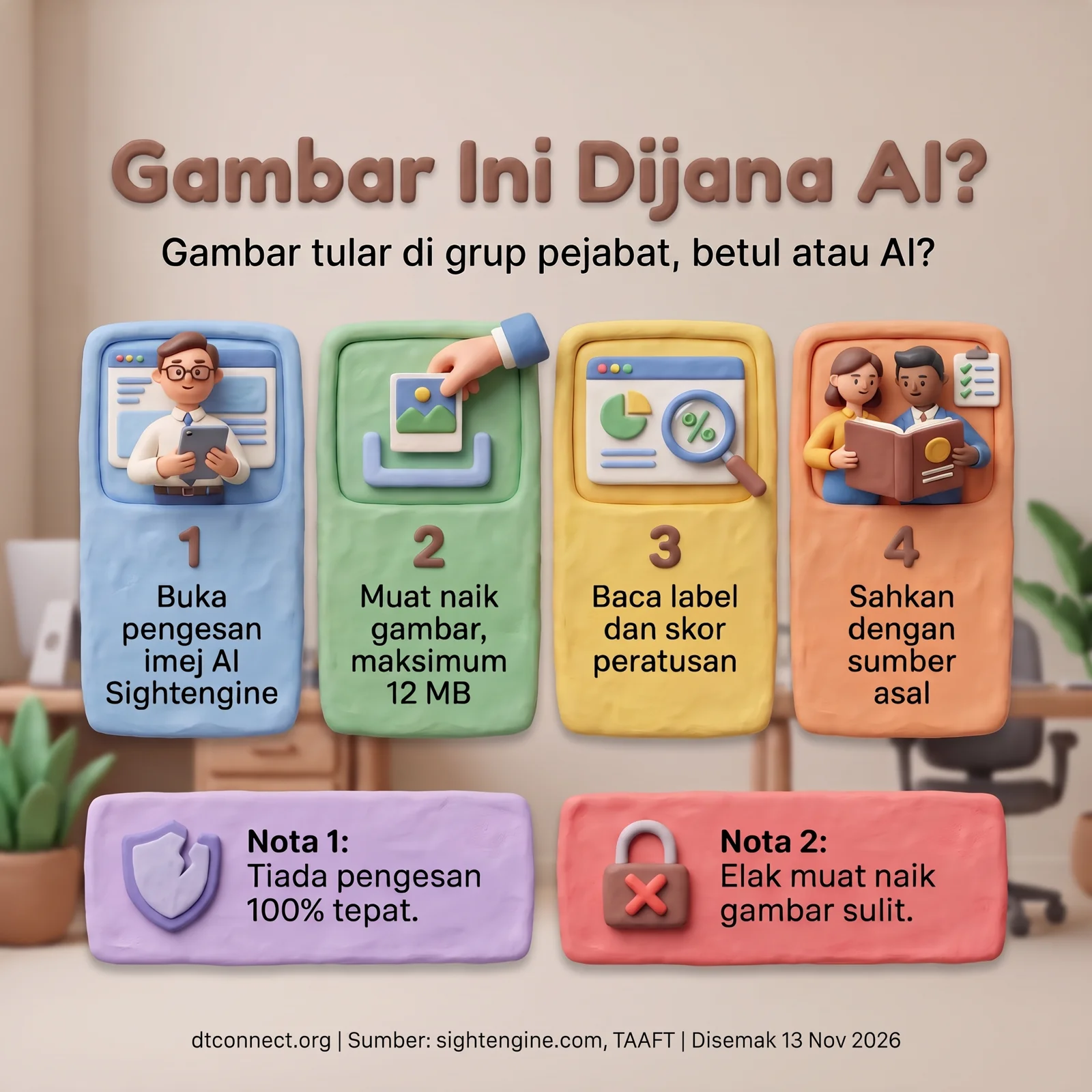
- Buka laman pengesan imej AI Sightengine di pelayar web.
- Jatuhkan atau muat naik gambar yang anda ragui. Pastikan saiznya tidak melebihi 12 MB.
- Baca label keputusan dan skor peratusan yang dipaparkan.
- Lihat pecahan mengikut jenis penjana untuk maklumat tambahan.
- Sahkan dengan sumber asal, contohnya laman berita rasmi atau orang yang mula-mula menyiarkan gambar itu, sebelum anda berkongsi.
Had dan perkara yang perlu diberi perhatian
Keputusan boleh tersilap. Sightengine sendiri memberi amaran bahawa pengesan media AI boleh menghasilkan keputusan tidak tepat. Ini termasuk positif palsu (gambar sebenar disangka AI) dan negatif palsu (gambar AI disangka sebenar). Menurut Sightengine, tiada pengesan yang 100% boleh dipercayai. Anggap skor sebagai petunjuk sahaja, dan gabungkan dengan pertimbangan anda sendiri.
Label “Uncertain”. Kadangkala keputusan ialah “Uncertain if AI-generated or not”. Maksudnya alat itu sendiri tidak pasti. Dalam keadaan ini, jangan berkongsi sehingga anda dapat mengesahkan sumbernya.
Privasi dan simpanan fail. Laman menyatakan “No human reviewers in the loop. Your content stays private.”, iaitu tiada manusia yang menyemak kandungan anda. Namun, tempoh simpanan dan cara pemadaman fail yang dimuat naik tidak dinyatakan. Jadi, elakkan memuat naik gambar sulit, dokumen jabatan atau gambar peribadi murid dan keluarga.
Had percuma tidak jelas. Pelan Free 2,000 operasi sebulan disenaraikan di laman harga. Had untuk penggunaan di laman pengesan tanpa akaun pula tidak dinyatakan dalam angka.
Sesuai untuk siapa
Alat ini sesuai untuk pekerja pejabat, guru dan ibu bapa yang kerap menerima gambar tular dalam kumpulan WhatsApp atau media sosial. Ia memberi cara mudah untuk membuat semakan awal tanpa perlu mahir teknologi.
Guru juga boleh menggunakannya sebagai contoh di dalam kelas untuk mengajar murid supaya tidak terus percaya pada gambar yang mereka lihat di internet.
Kesimpulan
Sightengine AI Image Detector membantu anda menyemak gambar yang disyaki dijana AI dengan cepat, berdasarkan piksel gambar, dan memberi label serta skor peratusan. Ada pelan percuma untuk bermula. Ingat tiga perkara: tiada pengesan yang 100% tepat, elakkan memuat naik gambar sulit, dan sentiasa sahkan dengan sumber asal sebelum berkongsi.
Sumber
- Sightengine, AI-generated image detection: sightengine.com
- Sightengine, Sightengine Detect: AI content verification: sightengine.com
- Sightengine, Pricing: sightengine.com
Artikel ini bebas dan tidak ditaja. Ciri dan harga disemak pada 13 November 2026 dan mungkin berubah.
Read this article in English
A picture is shared in the office WhatsApp group. It looks real, but something feels off. Some people forward it straight away to other groups, while others simply trust their gut feeling.
Both approaches are risky. Images generated by AI (artificial intelligence) are increasingly hard to tell apart with the naked eye. If you share a fake picture, false information spreads with your name behind it.
Sightengine AI Image Detector is an online tool that checks whether an image may be AI-generated. In this article we explain what it does, its pricing, how to get started and the limits you should know about.
What it does
Sightengine AI Image Detector is developed by Sightengine. You simply drop or upload an image or video directly on the page. Images can be up to 12 MB.
According to Sightengine, detection is based on pixel content (the tiny dots that make up an image), not metadata (hidden information in the file such as the date and camera type). So the tool can still work even when an image has no metadata or watermark.
After the check, you see a result label, a percentage score and a breakdown by type of image generator. This gives you an early hint before you decide whether to share.
Sightengine also has a dashboard called Sightengine Detect. It is a no-code dashboard (no programming knowledge needed) for uploading image, video or audio files, and results are shown within seconds.
Key features
- Upload directly on the page: Drop or upload an image or video. Images up to 12 MB.
- Pixel-based checks: Not reliant on metadata, and works even without metadata or a watermark.
- Result labels: These include “Likely AI-generated”, “Likely Deepfake”, “Not likely to be AI-generated or Deepfake” and “Uncertain if AI-generated or not”. A deepfake is an image or video in which a face has been faked with AI.
- Scores and breakdown: A percentage score, a breakdown by generator type (Diffusion, GAN, Other) and a face manipulation score.
- Generator list: Includes DALL-E, Firefly, Flux, Ideogram, Imagen, Midjourney, Nano Banana and Stable Diffusion. According to Sightengine, new generators are added continuously.
- Sightengine Detect: A no-code dashboard for images, video and audio. For video, AI detection results are shown frame by frame on a timeline.
Pricing
The official page states “Free plan available”. The pricing page lists four plans, with prices in USD:
- Free: 2,000 operations a month, a maximum of 500 a day.
- Starter: $29 a month, including 10,000 operations a month, plus $0.002 for each additional operation.
- Pro: $99 a month, including 40,000 operations a month, plus $0.002 for each additional operation.
- Enterprise: Custom pricing. You need to contact the sales team.
For the detector page itself, the free usage limit without an account is not stated as a number. Once that limit is reached, the page asks you to create a free account for more use.
Prices were checked on 13 November 2026 and may change.
How to get started
- Open the Sightengine AI image detector page in your web browser.
- Drop or upload the image you are unsure about. Make sure it is no larger than 12 MB.
- Read the result label and percentage score shown.
- Look at the breakdown by generator type for extra information.
- Confirm with the original source, for example an official news site or the person who first posted the image, before you share it.
Limits and things to watch
Results can be wrong. Sightengine itself warns that AI media detectors can produce inaccurate results. These include false positives (a real image mistaken for AI) and false negatives (an AI image mistaken for real). According to Sightengine, no detector is 100% reliable. Treat the score as a hint only, and combine it with your own judgement.
The “Uncertain” label. Sometimes the result is “Uncertain if AI-generated or not”. This means the tool itself is not sure. In this case, do not share until you can confirm the source.
Privacy and file storage. The page states “No human reviewers in the loop. Your content stays private.”, meaning no person reviews your content. However, how long uploaded files are kept and how they are deleted is not stated. So avoid uploading confidential images, department documents or personal photos of pupils and family.
Unclear free limit. The Free plan of 2,000 operations a month is listed on the pricing page. The limit for using the detector page without an account is not stated as a number.
Who it is for
This tool suits office workers, teachers and parents who often receive viral images in WhatsApp groups or on social media. It offers a simple way to do an early check without being tech-savvy.
Teachers can also use it as a classroom example to teach pupils not to believe every image they see on the internet straight away.
Conclusion
Sightengine AI Image Detector helps you quickly check images suspected of being AI-generated, based on the image pixels, and gives a label and percentage score. There is a free plan to get started. Remember three things: no detector is 100% accurate, avoid uploading confidential images, and always confirm with the original source before sharing.
Sources
- Sightengine, AI-generated image detection: sightengine.com
- Sightengine, Sightengine Detect: AI content verification: sightengine.com
- Sightengine, Pricing: sightengine.com
This article is independent and not sponsored. Features and prices were checked on 13 November 2026 and may change.