 DIMENSI
Copilot dalam Edge: Kawal Akses kepada Kandungan Halaman dan Tab Anda
Anda membuka sistem HR atau portal pelanggan di Microsoft Edge. Kemudian anda terus meminta Copilot meringkaskan halaman itu. Mudah dan cepat. Tetapi pernahkah anda bertanya, apa sebenarnya yang Copilot boleh lihat?
Ramai pengguna membiarkan tetapan asal begitu sahaja. Hakikatnya, Copilot dalam Edge boleh menggunakan kandungan halaman, tajuk halaman, tab yang terbuka dan sejarah pelayaran anda. Di Malaysia, akses ini lazimnya hidup secara lalai.
Artikel ini menerangkan tetapan Copilot dalam Edge yang mengawal akses kepada kandungan halaman. Kami terangkan apa fungsinya, cara mematikannya dan perkara yang perlu anda jaga, terutamanya jika anda selalu membuka maklumat sulit.
Apa fungsinya
Copilot ialah pembantu AI (kecerdasan buatan) yang terbina dalam pelayar Microsoft Edge. Apabila soalan anda merujuk kandungan halaman, contohnya “ringkaskan halaman ini”, video atau PDF, Copilot boleh menggunakan halaman semasa, tajuk halaman, tab yang terbuka dan sejarah pelayaran anda.
Jika soalan anda tidak merujuk halaman, Edge hanya menggunakan URL (alamat laman), tajuk halaman, soalan anda dan sejarah perbualan sebelumnya. Cadangan soalan yang muncul pula menggunakan tajuk dan URL tab yang terbuka.
Microsoft menyediakan satu tetapan untuk mematikan akses ini. Selepas dimatikan, Copilot berhenti menggunakan halaman semasa, tajuk halaman, tab terbuka dan sejarah pelayaran untuk menjawab soalan anda.
Ciri utama
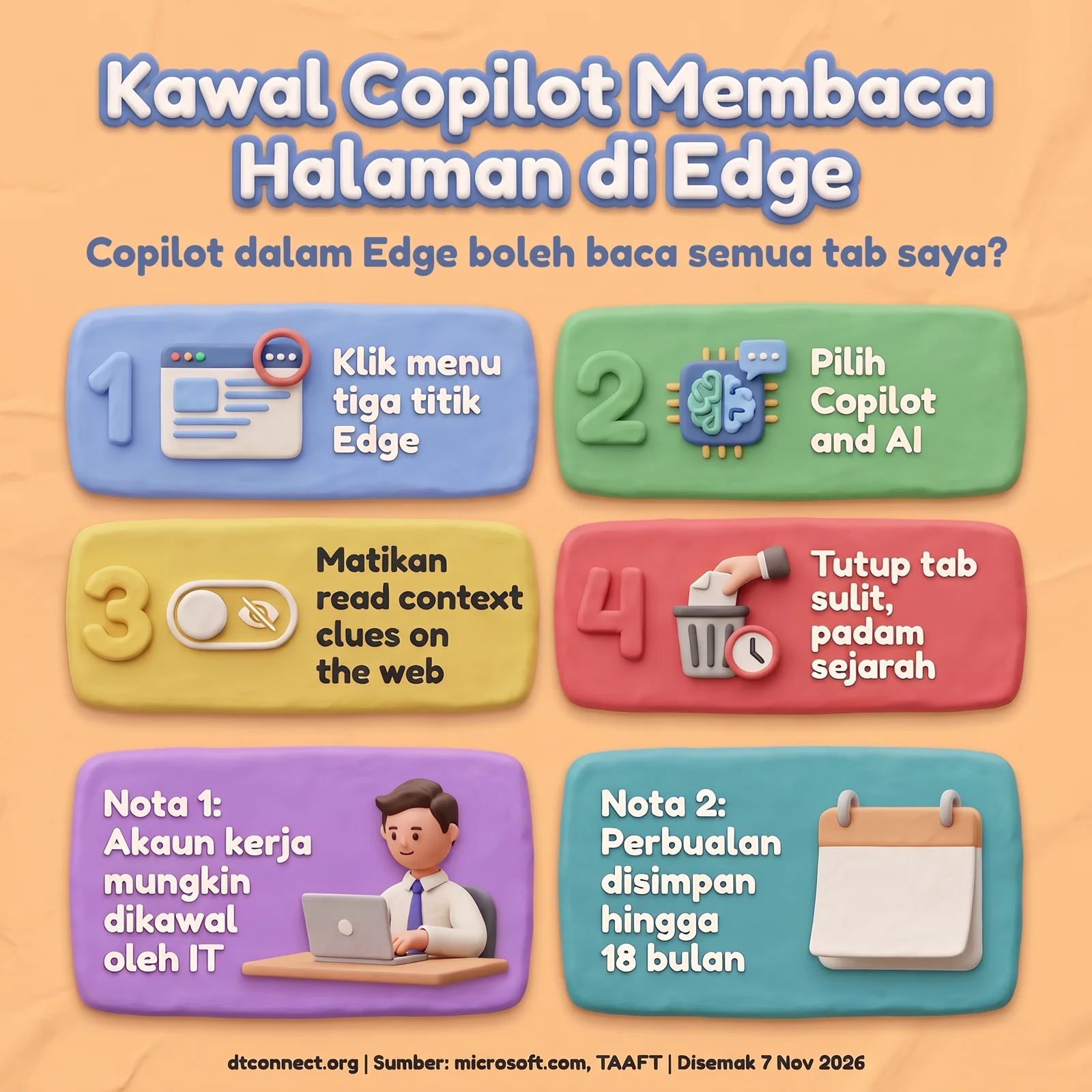
- Tetapan “Allow Copilot to read context clues on the web”: Terletak di bawah “Copilot and AI” dalam menu Edge. Anda boleh menghidupkan atau mematikannya sendiri.
- Konteks pelayaran: Copilot boleh menggunakan halaman semasa, tab terbuka dan sejarah pelayaran apabila soalan anda merujuk halaman.
- Pembuangan maklumat: Anda boleh membuang maklumat daripada konteks dengan menutup tab dan memadam sejarah pelayaran.
- Polisi IT “CopilotPageContext”: Pentadbir IT boleh mengawal akses ini bagi akaun kerja atau sekolah (profil Microsoft Entra ID). Jika polisi tidak ditetapkan, akses hidup secara lalai di luar EU, termasuk Malaysia, dan mati secara lalai di EU.
- Kawalan sejarah perbualan: Anda boleh memadam satu perbualan atau seluruh sejarah Copilot pada bila-bila masa.
Harga
Tetapan ini sendiri tidak dikenakan sebarang kos. Ia sebahagian daripada pelayar Edge.
Copilot dalam Edge memerlukan anda log masuk. Microsoft menyebut ada had penggunaan percuma. Had yang lebih tinggi memerlukan langganan Microsoft 365. Laman rasmi tidak menyatakan angka had penggunaan percuma itu.
Harga disemak pada 7 November 2026 dan mungkin berubah.
Cara bermula
- Buka Microsoft Edge dan klik menu More (tiga titik) di bar alat.
- Pilih “Copilot and AI”.
- Cari “Allow Copilot to read context clues on the web”.
- Matikan tetapan itu sebelum anda membuka halaman sulit.
- Tutup tab sulit dan padam sejarah pelayaran yang tidak mahu digunakan sebagai konteks.
Had dan perkara yang perlu diberi perhatian
Nama tetapan mungkin berbeza. Laman sokongan rasmi kini menggunakan nama “Allow Copilot to read context clues on the web”. Panduan lama menyebut “Allow Microsoft to access page content”. Semak label sebenar dalam versi Edge anda.
Jangan kongsi maklumat sensitif. Microsoft sendiri menasihati supaya anda tidak berkongsi maklumat sensitif yang anda tidak mahu digunakan sebagai konteks pelayaran.
Latihan AI. Microsoft menggunakan data Copilot pengguna biasa untuk melatih AI. Antara pengecualian ialah pengguna akaun kerja atau sekolah Entra ID, pengguna bawah 18 tahun, pengguna yang tidak log masuk dan pengguna yang memilih keluar (opt out). Bahagian FAQ privasi ini merujuk “older Copilot app”, dan tidak menyatakan dengan jelas sama ada kandungan halaman dari Edge turut digunakan untuk latihan.
Tempoh simpanan. Secara lalai, aktiviti perbualan Copilot disimpan selama 18 bulan. Laman sokongan Edge tidak menyatakan tempoh simpanan bagi data konteks halaman.
Akaun kerja. Polisi CopilotPageContext hanya untuk profil Entra ID, bukan akaun Microsoft peribadi. Ia disokong pada Edge versi 124 ke atas untuk Windows dan macOS, tidak untuk Android dan iOS. Polisi ini juga tidak mengawal Copilot dengan “enterprise data protection” (EDP, perlindungan data perusahaan), yang mempunyai polisi berasingan, EdgeEntraCopilotPageContext. Jika anda guna akaun kerja, tetapan anda mungkin dikawal oleh jabatan IT.
Sesuai untuk siapa
Panduan ini sesuai untuk pekerja pejabat yang selalu membuka sistem HR, portal pelanggan, rekod kewangan atau dokumen dalaman di Edge. Ia juga berguna kepada sesiapa yang menggunakan akaun Microsoft peribadi dan mahu mengawal apa yang dilihat oleh Copilot.
Pentadbir IT pula boleh menggunakan polisi CopilotPageContext untuk menetapkan akses ini bagi semua akaun kerja dalam organisasi.
Kesimpulan
Copilot dalam Edge memudahkan kerja, tetapi ia boleh melihat lebih banyak daripada yang anda sangka. Luangkan seminit untuk menyemak tetapan “Copilot and AI” hari ini. Matikan akses kandungan halaman sebelum membuka maklumat sulit, tutup tab yang tidak perlu dan padam sejarah pelayaran. Jika anda guna akaun kerja, rujuk jabatan IT anda.
Sumber
- Microsoft Support, Copilot in Microsoft Edge (help 5028615): support.microsoft.com
- Microsoft Learn, Edge policy CopilotPageContext: learn.microsoft.com
- Microsoft, Copilot in Edge: explore.microsoft.com
- Microsoft Support, Privacy FAQ for Microsoft Copilot: support.microsoft.com
Artikel ini bebas dan tidak ditaja. Ciri dan harga disemak pada 7 November 2026 dan mungkin berubah.
Read this article in English
You open an HR system or a customer portal in Microsoft Edge. Then you ask Copilot to summarise the page. Quick and easy. But have you ever asked what Copilot can actually see?
Many users leave the default settings as they are. In fact, Copilot in Edge can use the page content, page title, open tabs and your browsing history. In Malaysia, this access is usually on by default.
This article explains the Copilot in Edge setting that controls access to page content. We cover what it does, how to turn it off and what to watch out for, especially if you often open confidential information.
What it does
Copilot is an AI assistant built into the Microsoft Edge browser. When your question refers to page content, for example “summarise this page”, a video or a PDF, Copilot can use the current page, the page title, your open tabs and your browsing history.
If your question does not refer to the page, Edge only uses the URL, the page title, your question and previous conversation history. Suggested questions use the titles and URLs of your open tabs.
Microsoft provides a setting to turn this access off. Once it is off, Copilot stops using the current page, page title, open tabs and browsing history to answer you.
Key features
- “Allow Copilot to read context clues on the web” setting: Found under “Copilot and AI” in the Edge menu. You can turn it on or off yourself.
- Browsing context: Copilot can use the current page, open tabs and browsing history when your question refers to the page.
- Removing information: You can remove information from the context by closing tabs and deleting your browsing history.
- “CopilotPageContext” IT policy: IT administrators can control this access for work or school accounts (Microsoft Entra ID profiles). If the policy is not set, access is on by default outside the EU, including Malaysia, and off by default in the EU.
- Conversation history control: You can delete a single conversation or your entire Copilot history at any time.
Pricing
The setting itself costs nothing. It is part of the Edge browser.
Copilot in Edge requires you to sign in. Microsoft mentions a free usage allowance. Higher limits require a Microsoft 365 subscription. The official page does not state the size of the free allowance.
Prices were checked on 7 November 2026 and may change.
Getting started
- Open Microsoft Edge and click the More menu (three dots) on the toolbar.
- Select “Copilot and AI”.
- Find “Allow Copilot to read context clues on the web”.
- Turn the setting off before you open confidential pages.
- Close confidential tabs and delete browsing history you do not want used as context.
Limits and things to watch
The setting name may differ. The official support page now uses “Allow Copilot to read context clues on the web”. Older guides mention “Allow Microsoft to access page content”. Check the actual label in your version of Edge.
Do not share sensitive information. Microsoft itself advises you not to share sensitive information that you do not want used as browsing context.
AI training. Microsoft uses regular users’ Copilot data to train AI. Exceptions include users of Entra ID work or school accounts, users under 18, users who are not signed in and users who opt out. This part of the privacy FAQ refers to the “older Copilot app”, and does not clearly say whether page content from Edge is also used for training.
Retention. By default, Copilot conversation activity is kept for 18 months. The Edge support page does not state how long page context data is kept.
Work accounts. The CopilotPageContext policy applies only to Entra ID profiles, not personal Microsoft accounts. It is supported on Edge version 124 and later for Windows and macOS, not Android or iOS. It also does not control Copilot with “enterprise data protection” (EDP), which has a separate policy, EdgeEntraCopilotPageContext. If you use a work account, your setting may be managed by your IT department.
Who it is for
This guide suits office workers who often open HR systems, customer portals, financial records or internal documents in Edge. It is also useful for anyone using a personal Microsoft account who wants to control what Copilot sees. IT administrators can use the CopilotPageContext policy to set this access for all work accounts in the organisation.
Conclusion
Copilot in Edge makes work easier, but it can see more than you might think. Take a minute to check your “Copilot and AI” settings today. Turn off page content access before opening confidential information, close tabs you do not need and delete your browsing history. If you use a work account, check with your IT department.
Sources
- Microsoft Support, Copilot in Microsoft Edge (help 5028615): support.microsoft.com
- Microsoft Learn, Edge policy CopilotPageContext: learn.microsoft.com
- Microsoft, Copilot in Edge: explore.microsoft.com
- Microsoft Support, Privacy FAQ for Microsoft Copilot: support.microsoft.com
This article is independent and not sponsored. Features and prices were checked on 7 November 2026 and may change.