 DIMENSI
Zotero: Cara Semak Rujukan Jurnal daripada Chatbot AI Sebelum Anda Memetiknya
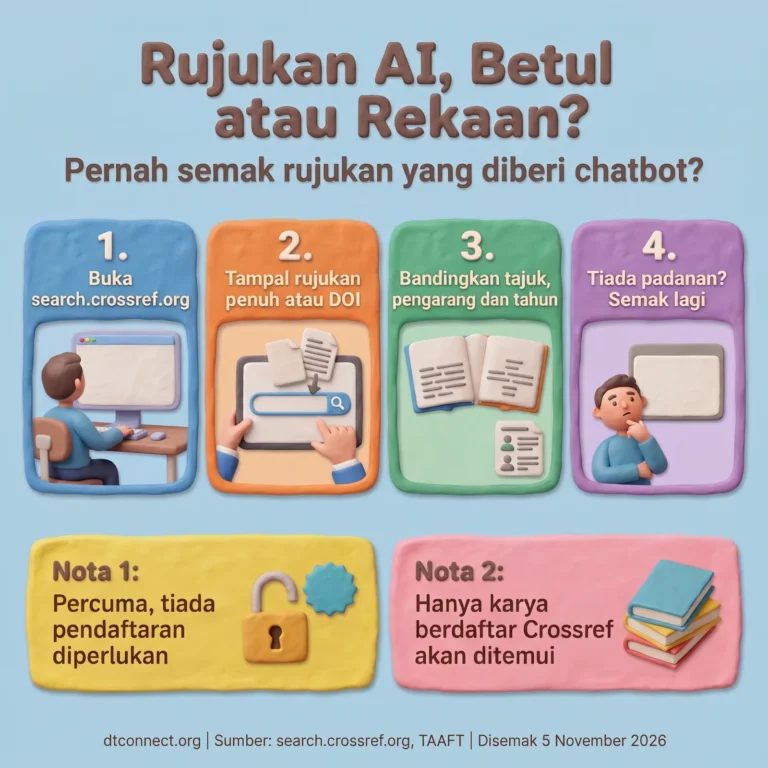
Anda minta chatbot AI mencadangkan rujukan jurnal untuk laporan kerja. Dalam beberapa saat, ia memberi lima rujukan lengkap dengan tajuk, penulis dan tahun. Semuanya nampak kemas dan meyakinkan.
Masalahnya, chatbot boleh memberi rujukan yang tidak wujud. Ada juga rujukan yang wujud, tetapi kertasnya sudah ditarik balik (retracted, iaitu dibatalkan oleh penerbit kerana ada masalah). Jika anda terus menyalin senarai itu ke dalam laporan, nama anda yang akan terjejas.
Zotero boleh membantu anda menyemak rujukan itu satu per satu. Perlu jelas dari awal: Zotero bukan chatbot AI. Ia alat pengurusan rujukan. Dalam artikel ini, kita guna Zotero untuk menyemak rujukan yang diberi oleh AI.
Apa fungsinya
Zotero ialah alat percuma untuk mengumpul, menyusun, menanda, memetik dan berkongsi bahan penyelidikan. Ia sumber terbuka (open source, iaitu kod aturcaranya terbuka kepada umum) dan dibangunkan oleh sebuah organisasi bebas yang tidak mencari untung.
Untuk tujuan menyemak jawapan AI, dua fungsi Zotero paling berguna. Pertama, ia boleh mencari maklumat sesebuah kertas melalui DOI (Digital Object Identifier, iaitu nombor pengenalan unik bagi artikel jurnal). Jika DOI daripada chatbot tidak membawa kepada sebarang rekod, itu tanda awal rujukan tersebut bermasalah. Kedua, Zotero memberi amaran jika kertas dalam pustaka anda sudah ditarik balik.
Ciri utama
- Add Item by Identifier: Tambah item dengan memasukkan ISBN, DOI, PubMed ID, arXiv ID atau ADS Bibcode. DOI dicari melalui CrossRef dan pendaftaran lain. Anda boleh memasukkan beberapa pengecam sekali gus, dipisahkan dengan ruang, koma atau baris baharu.
- Amaran kertas ditarik balik: Hasil kerjasama dengan Retraction Watch (pangkalan data kertas yang ditarik balik). Kertas yang ditarik balik ditanda dalam senarai item, dan amaran dipaparkan di atas panel item.
- Amaran semasa memetik: Jika anda memetik kertas yang ditarik balik melalui pemalam (plugin, iaitu tambahan kecil) pemproses kata, Zotero memberi amaran dan meminta anda mengesahkannya dahulu.
- Zotero Connector: Sambungan pelayar untuk Chrome, Firefox, Edge dan Safari. Ia menyimpan item daripada laman web. Jika laman itu tiada metadata (maklumat asas seperti tajuk dan penulis) yang dikenali, item disimpan sebagai Web Page.
- Banyak platform: Tersedia untuk Mac, Windows, Linux, iOS dan Android. Ia berfungsi dalam Word, LibreOffice dan Google Docs, serta menyokong lebih 9,000 gaya petikan.
- Privasi semakan: Semakan penarikan balik dibuat secara tempatan di komputer anda. Pelayan Zotero tidak dapat mengetahui sama ada anda memegang kertas yang ditarik balik. Sync (penyelarasan ke awan) tidak diperlukan, dan Zotero menyatakan ia tidak merekod kandungan semakan ini.
Harga
Perisian Zotero percuma. Anda hanya perlu membayar jika mahu storan awan tambahan untuk menyelaraskan fail dan lampiran. Storan awan individu (dalam USD):
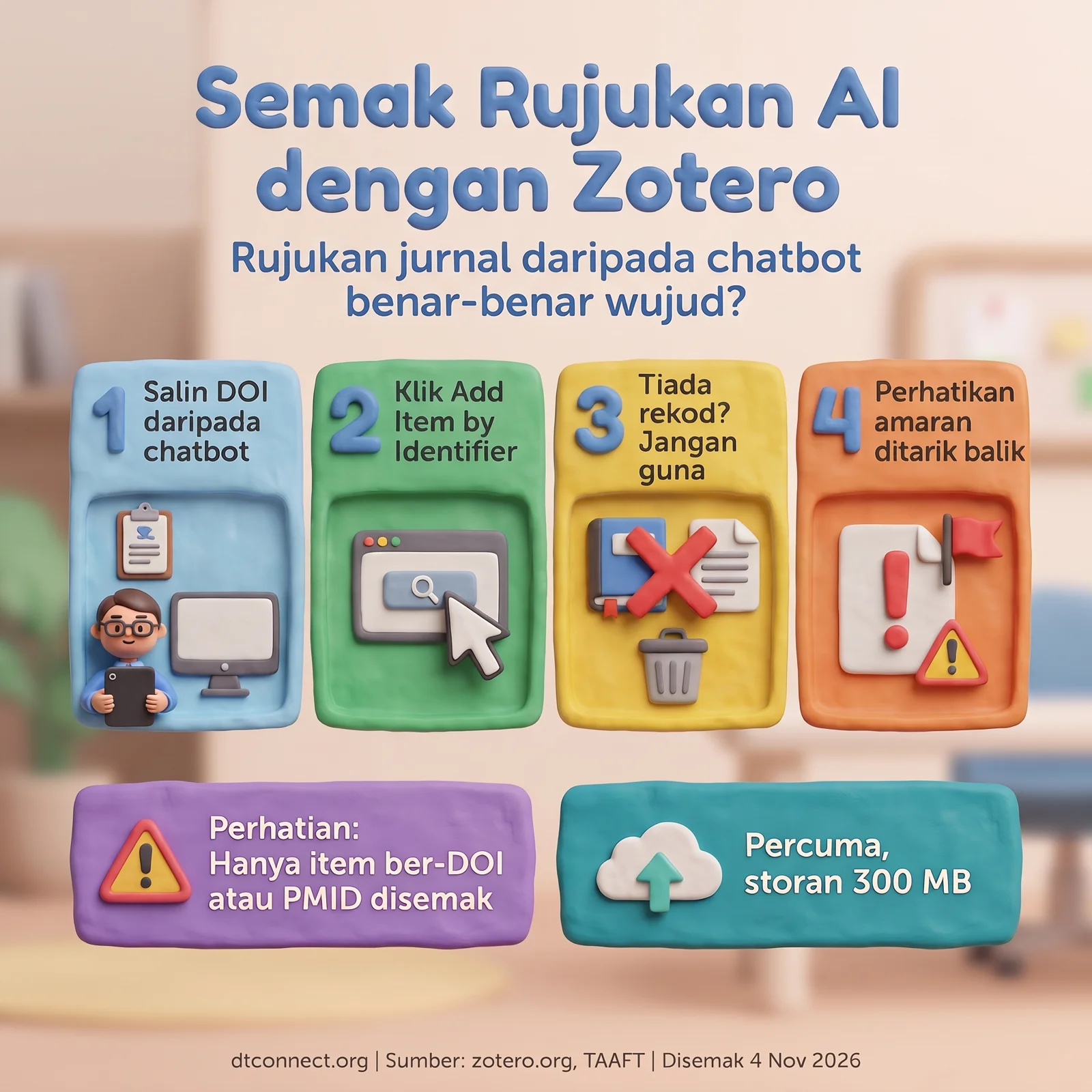
- Free: 300 MB, percuma.
- 2 GB: USD20 setahun (bersamaan kira-kira USD1.67 sebulan).
- 6 GB: USD60 setahun (bersamaan USD5 sebulan).
- Unlimited: USD120 setahun (bersamaan USD10 sebulan).
Perkongsian pustaka dengan orang lain juga dinyatakan tanpa kos. Semakan penarikan balik tidak memerlukan bayaran atau sync.
Harga disemak pada 4 November 2026 dan mungkin berubah.
Cara bermula
- Muat turun dan pasang Zotero dari zotero.org.
- Pasang Zotero Connector untuk pelayar anda, jika mahu menyimpan item terus dari laman web.
- Salin nombor DOI daripada jawapan chatbot.
- Klik butang Add Item by Identifier di bar alat, tampal DOI itu dan tekan Enter.
- Banding tajuk, penulis dan tahun yang muncul dengan apa yang ditulis oleh chatbot. Jika tiada rekod dijumpai atau butirannya berbeza, jangan guna rujukan itu.
- Perhatikan sebarang amaran penarikan balik pada item tersebut.
Tip: Jika chatbot memberi banyak rujukan, tampal semua DOI sekali gus dalam Add Item by Identifier. Pisahkan dengan koma atau baris baharu.
Had dan perkara yang perlu diberi perhatian
- Bukan semua rujukan disemak. Semakan penarikan balik hanya untuk item yang ada DOI atau PMID (nombor PubMed). Ini meliputi kira-kira tiga perempat data Retraction Watch.
- Rujukan tanpa DOI. Buku, laporan dan laman web yang tiada DOI perlu disemak dengan cara lain.
- DOI wujud tidak bermaksud isinya betul. Kertas itu mungkin wujud, tetapi chatbot mungkin salah menerangkan isinya. Baca abstrak atau teks asal sebelum memetik.
- Bukan alat AI generatif. Zotero tidak menulis atau menjawab soalan. Ia membantu anda mengurus dan menyemak rujukan.
- Maklumat ciri bertarikh 2019. Ciri amaran penarikan balik diumumkan untuk Zotero 5.0.67 pada 14 Jun 2019. Rupa antara muka terkini mungkin berbeza.
- Bahasa Melayu belum disahkan. Kami belum dapat mengesahkan sama ada antara muka Zotero tersedia dalam Bahasa Melayu.
- Storan percuma terhad. 300 MB mungkin cepat penuh jika anda menyimpan banyak fail PDF.
Sesuai untuk siapa
Zotero sesuai untuk pegawai penyelidikan, pensyarah, pelajar pascasiswazah dan penulis laporan. Ia juga sesuai untuk sesiapa sahaja yang kerap menggunakan rujukan daripada chatbot AI dan mahu memastikan rujukan itu benar-benar wujud sebelum dipetik.
Kesimpulan
Chatbot AI pantas memberi rujukan, tetapi bukan semua rujukan itu boleh dipercayai. Zotero bukan chatbot AI. Ia alat rujukan percuma yang membantu anda menyemak DOI dan memberi amaran tentang kertas yang ditarik balik. Biasakan diri menyemak setiap rujukan sebelum memasukkannya ke dalam laporan, dan baca sendiri sumber asalnya.
Sumber
- Zotero, laman utama: zotero.org
- Zotero Documentation, Adding Items to Zotero: zotero.org
- Zotero Blog, Retracted item notifications with Retraction Watch integration (14 Jun 2019): zotero.org
- Zotero Storage: zotero.org
Artikel ini bebas dan tidak ditaja. Ciri dan harga disemak pada 4 November 2026 dan mungkin berubah.
Read this article in English
You ask an AI chatbot to suggest journal references for a work report. Within seconds, it gives you five complete references with titles, authors and years. They all look neat and convincing.
The problem is that chatbots can give references that do not exist. Some references do exist, but the paper has been retracted (withdrawn by the publisher because of a problem). If you copy that list straight into your report, it is your name that suffers.
Zotero can help you check those references one by one. Let us be clear from the start: Zotero is not an AI chatbot. It is a reference management tool. In this article, we use Zotero to check references given by AI.
What it does
Zotero is a free tool for collecting, organising, annotating, citing and sharing research. It is open source (its program code is open to the public) and is developed by an independent nonprofit organisation.
For checking AI answers, two Zotero functions are most useful. First, it can look up details of a paper through its DOI (Digital Object Identifier, a unique ID number for a journal article). If a DOI from a chatbot does not lead to any record, that is an early sign the reference has a problem. Second, Zotero warns you if a paper in your library has been retracted.
Key features
- Add Item by Identifier: Add an item by entering an ISBN, DOI, PubMed ID, arXiv ID or ADS Bibcode. DOIs are looked up through CrossRef and other registries. You can enter several identifiers at once, separated by spaces, commas or new lines.
- Retracted paper alerts: The result of a partnership with Retraction Watch (a database of retracted papers). Retracted papers are marked in the item list, and a warning appears at the top of the item pane.
- Alerts when citing: If you cite a retracted paper through the word processor plugin (a small add-on), Zotero warns you and asks you to confirm first.
- Zotero Connector: A browser extension for Chrome, Firefox, Edge and Safari. It saves items from web pages. If a page has no recognised metadata (basic details such as title and author), the item is saved as a Web Page.
- Many platforms: Available for Mac, Windows, Linux, iOS and Android. It works in Word, LibreOffice and Google Docs, and supports more than 9,000 citation styles.
- Privacy of checks: Retraction checks are done locally on your computer. Zotero’s servers cannot tell whether you hold a retracted paper. Sync (syncing to the cloud) is not required, and Zotero states that it does not log the content of these checks.
Pricing
The Zotero software is free. You only pay if you want extra cloud storage to sync files and attachments. Individual cloud storage (in USD):
- Free: 300 MB, free.
- 2 GB: USD20 per year (about USD1.67 per month).
- 6 GB: USD60 per year (USD5 per month).
- Unlimited: USD120 per year (USD10 per month).
Sharing libraries with others is also stated to be at no cost. Retraction checks do not require payment or sync.
Prices were checked on 4 November 2026 and may change.
How to get started
- Download and install Zotero from zotero.org.
- Install the Zotero Connector for your browser if you want to save items directly from web pages.
- Copy the DOI number from the chatbot’s answer.
- Click the Add Item by Identifier button on the toolbar, paste the DOI and press Enter.
- Compare the title, authors and year that appear with what the chatbot wrote. If no record is found or the details differ, do not use that reference.
- Watch for any retraction warning on the item.
Tip: If the chatbot gives many references, paste all the DOIs at once into Add Item by Identifier. Separate them with commas or line breaks.
Limits and things to watch
- Not every reference is checked. Retraction checks only cover items with a DOI or PMID (PubMed number). This covers about three quarters of Retraction Watch data.
- References without a DOI. Books, reports and web pages without a DOI need to be checked another way.
- A real DOI does not mean the content is right. The paper may exist, but the chatbot may describe its content wrongly. Read the abstract or the original text before citing.
- Not a generative AI tool. Zotero does not write or answer questions. It helps you manage and check references.
- Feature information dates from 2019. The retraction alert feature was announced for Zotero 5.0.67 on 14 June 2019. The current interface may look different.
- Bahasa Melayu not confirmed. We could not confirm whether the Zotero interface is available in Bahasa Melayu.
- Limited free storage. 300 MB may fill up quickly if you store many PDF files.
Who it suits
Zotero suits research officers, lecturers, postgraduate students and report writers. It also suits anyone who often uses references from AI chatbots and wants to make sure those references really exist before citing them.
Conclusion
AI chatbots give references quickly, but not all of them can be trusted. Zotero is not an AI chatbot. It is a free reference tool that helps you check DOIs and warns you about retracted papers. Make it a habit to check every reference before putting it in your report, and read the original source yourself.
Sources
- Zotero, home page: zotero.org
- Zotero Documentation, Adding Items to Zotero: zotero.org
- Zotero Blog, Retracted item notifications with Retraction Watch integration (14 June 2019): zotero.org
- Zotero Storage: zotero.org
This article is independent and not sponsored. Features and prices were checked on 4 November 2026 and may change.